

For those who are unfamiliar with the word “luddite”, it was an organized movement of unemployed textile workers being against progress and sabotaging equipment like the power loom in the post banner. We don’t do sabotage, but we’re also not unemployed … yet! On the other hand, many of us seem to be struck by the Ostrich effect.
The modern luddite attitude to AI
It proved difficult to find an image of an ostrich with the head in the sand with an acceptable licence - so this one is AI-generated:

The AI scares me a bit. The development is going fast and furious, I think it’s going to change society a lot and very fast - much more than the industrial revolution. I’m sure not the only one thinking like this. I do sysadmin for a living and programming as a hobby - soon there may not be any need for such skills. Some of the common strategies to avoid psychological discomfort are:
- Consider it to be evil black magic, not to be used and not to be spoken about.
- Underestimate the AI …
- “AI can only regurgitate code snippets it’s seen before”
- “Vibe-coding is a recipe for disaster”
- “Skilled programmers have no use for AI”
- “My projects are too advanced for the AI”
I’ve been there myself - sticking to all the bullet points above. I did play a little bit with the dark magic, but I did have a line in the sand - I wouldn’t pay money for AI-assistance.
The express train

The AI is coming fast and furious, no matter what we do. The AI-tools, including programming assistants, are genuinely useful today. If ignoring it, one will be left behind at the platform while the express train is leaving. I would guess the amount of sysadmins and programmers having a stable job in 5-10 years time is a lot less than today. People burying their head in the sand and ignoring the development are most likely the first ones to become unemployed.
GitHub Copilot

GitHub Copilot is probably useful - I did test it for some few hours, it simply didn’t work for me that day, and it wasted my free test-credits while I was chatting with it trying to figure out what was wrong. (The AI burning credits fast on pure stupidity may be a problem with Claude as well). So that’s all I have to share about GitHub Copilot in this post.
Claude - first impression was very good

A friend hinted me already a year ago or so “Claude is superb!”. Anyway, I was sticking my head in the sand … Claude Code costs money to run, so it’s not for me - and in my projects I want real code, not regurgitated code snippets, yada yada …
I gave it a new try by the end of 2025 and my first impression was genuinely positively surprising me. It was A LOT better than what I had imagined! The complex project I had that I believed only I understood fully - Claude seemed to grasp everything. It seems to understand context, it is able to dig down in a big project and come up with code review comments, and it’s possible to have a chat with it discussing design and feature ideas. In the beginning I would only use it for generating test code and write the real code myself - but eventually I found that it can create code faster and better than me - at least sometimes.
Claude - second impression not so good

Claude suggested to use the comics above - and I find it very fitting. Perhaps it was meant to illustrate that one can happily enjoy programming or relaxing with a cup of coffee if one ignores the AI or that the house is on fire, but I have some other perspectives to offer: Claude often does things without considering the consequences - it wouldn’t surprise me if Claude one day will manage to put a house on fire, even without realizing it’s a bad idea. It will also happily do whatever you ask from it. “I don’t like those blue curtains, red curtains would probably be better? Could you change them for me?” “Sure! Red curtains will be fine! It will fit much better than blue ones in a burning house. I’ll change them for you at once!”
Sometimes the design solutions are disastrous. Sometimes it seems to forget or ignore important information. Sometimes it does shortcuts. Before I started using Claude myself I received a pull request from someone using Claude - I rejected the pull request because it was duplicating code, in the next iteration the code paths and code logic was still duplicated, but with different code!
(I’m also appalled over how much CPU, memory and bandwidth Claude Code can use. All AI-work is by default done on the server side, and I suppose their API endpoint is stateless, meaning that all context has to be sent over for every request)
Claude is also very good at duplicating code and code paths. When finding a bug a bit later and asking Claude to fix it, it will fix it in one code path - so there will still be five different code paths with the same bug present that wasn’t fixed.
(Humans also tend to have those traits - coming up with disastrous design solutions, forgetting important information and instructions, taking shortcuts, duplicating code … and wasting bandwidth on videos instead of working).
Claude can be utilized smartly

The image above was also suggested by Claude. The conductor is having a hard time controlling his orchestra (Perhaps because of the cannon in the score. I fell totally into a rabbit hole here - I thought it was the 1812 overture, but that piece was composed in 1880, the painter died long before that. But I’m digressing again - sorry!).
Claude has a “Pro”-subscription and a “Max”-subscription costing five times as much and giving ten times as much credits. The “Pro”-subscription is too small for me, the “Max”-subscription too big. Anyway, I was upgrading to Max for a couple of months and trying to utilize all the credits, by having Claude helping me with multiple projects in parallel. I was a bit like the conductor in the image - having very little control over my Claude agents.
Your mileage may vary, but in my experiences as of today one cannot leave everything to Claude. It’s needed to spend some time thinking, some time considering the design suggestions, reviewing the changes Claude wants to do and the solutions it comes up with. It may be needed to double-check that it has understood all the instructions and are following them, manually test that things work as expected. It’s needed to ask Claude questions … “did you consider this corner case? What if …? Are you sure this is the best solution?”. Test code is paramount. Good usage of git is also important. I think it’s also a good idea to instruct Claude to make test code first and the real code afterwards. Perhaps most importantly, do start a completely fresh Claude-session without any context and ask for a code review every now and then.
The AI is getting faster, better, more powerful all the time

I think one should be careful saying “the AI cannot …”. Whatever is true today, is probably not true tomorrow. Whatever the AI is bad at today, it may possibly do very well tomorrow. Whatever I wrote just above will possibly already be outdated when you read this. It’s probably a waste of time and efforts for an old fart like me to try to become an “AI-expert” - whatever I learn today may be worthless tomorrow - but refusing to use the technology is maybe even more stupid.
Quick development
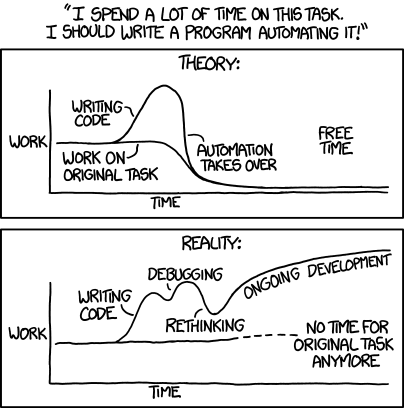
Claude can for sure do things much faster than me. Things that earlier would take me hours to do can be done in minutes by Claude. Things that earlier would take me days or years to fix can now take hours or days. If being lucky! Actually it gets even more difficult to give good time estimates when using the AI. Sometimes the AI gives something useful and good at the first attempt - other times one may end up chasing bad design decisions, bugs just keep popping up, nothing really works as planned, and the project drags on for weeks rather than hours.
(Oh, that sometimes applies to code written by humans as well).
I did estimate that I would spend 80 hours on one programming project, and this estimate was done before starting to use Claude. With assistance from Claude I did manage to finish it - after more than hundred hours working time plus “tokens”. And then I spent yet a lot of time fixing bugs and correcting things after the release.
Code quality
Utilized in a good way, Claude can improve code quality a lot. Ask it to do a code review, and it will often point out bugs or weak spots that you never thought about. Earlier I would typically litter my code with TODO-comments - “this could be done better, but it’s not so important - and I don’t have time now (probably never ever)”. Today I can just ask Claude … “by the way, I’ve left a TODO-comment in the code here, can you fix it?”.
I’ve also been revisiting some of my old projects and ask Claude to do a code review and modernize the project. Perhaps those TODO-comments I left there years ago wasn’t in vain after all!
Whenever hitting some bug or problem in third party software, or even some important missing feature, the proper thing to do would be to do some research, write down a proper and well-thought-through issue report, perhaps even fix the issue and deliver a pull request. This could sometimes take a full day or more - with the risk that no maintainer would even bother to read the issue. So in the end it was often easier to work around the issues rather than contributing to the community. Today I can just ask Claude to do the research for me, write a draft for an issue report and even submit a pull request.
Pull requests
As said, I do use Claude to submit pull requests to other projects, but I’m trying to be careful about it.
Some maintainers are really annoyed with AI-generated pull requests. Yes, I’m a maintainer myself, and I feel the pain. It may have taken the contributor five minutes to generate the pull request, and I may have to spend an hour reviewing it. It’s probably easier for me to have Claude generate the code myself than to review something thrown in by others.
When a human has spent perhaps a full day creating a crappy pull request, then I should at least respect this human and politely inform that it has improvement potential. If I know that the contribution was AI-generated I don’t need to care much about feelings. Hence transparency is really important, and I always start my pull requests with disclaimers that it was AI-generated and that I will not break down and cry if the submission is rejected. I believe that by discovering the bug, reproducing it and testing a potential fix I’m delivering value to the project.
Problem solving, new projects, out-of-the-comfort zone …
There are a lot of things I’m using Claude for now, for instance:
- General troubleshooting, i.e. on my laptop. I can give Claude access to check the journal, inspect config files and quite often it does find out of the root cause for my troubles and suggests some workarounds. Except for some wifi connection problem, I’ve had many iterations with Claude over that one, and all it does is chasing rabbits.
- Getting started with new projects. Quite often getting started is the hardest problem when something has been on the top of the TODO-list for a long time.
- Getting an overview of unknown and complex projects.
- Code and security audits of code I’m dependent on
- Getting tedious and time-consuming work done
- Doing things outside my comfort zone. Like, I can write some puppet code, but I’m clueless with Ruby, I never fully understood the spec testing framework, and I’ve never made a public Puppet module before. Now I’ve published several of them. I’ve also had Claude fixing things for me in programming languages I cannot understand.
Rabbit holes

Do I work more efficient than before? Every now and then I think “this is a five-minute task for Claude!”. So in the end, rather than working faster and better, I’m digging myself deeper and faster into more rabbit holes than ever before!
Anyway, by dealing with TODO-comments rather than letting them accumulate, by trying to get problems fixed upstream rather than ignoring the problems, frequent code review sessions, etc, I do hope that the overall quality of my projects increases.
Vibe coding

“Vibe coding” - it feels a bit like standing by the kitchen sink, staring at a pile of dirty dishes, then starting to wave a magic wand, and the cups and plates and sponge or brush starts dancing around making the dishes clean. I had no belief it was ever going to get anything good out of it - but I was wrong. For some tasks it works very well. It seems perfect for prototyping, perfect when all the testing can easily be automated. It still seems to require some guidance and oversight by someone who knows a bit about coding, design and engineering. Simon Willison had a blog article outlining the difference between irresponsible “vibe coding” and responsible “vibe engineering”
Another thing with the magic wand analogy - with a great magic wand comes great responsibility! In quite a lot of the storylines involving magic wands something goes very wrong because the user can’t handle the power. Same with vibe coding - you may all out of nothing be responsible for major data losses, lawsuits and whatnot!
Privacy and data control
I’d love to have my own GPU-rig in the basement that I could use for heating the house - and generating some code while doing so! I’ve been talking with people utilizing their own hardware for AI-generating of code, so it is possible. However, that’s a rabbit hole I have no intention to fall into, at least not today. De-facto, the very most people using AI today are sending data to the USA or China, and the data is then subject of the jurisdictions “over there”. Basically, one has absolutely zero control of what the data gets used for - both de-jure and de-facto. I’ve already heard stories that access tokens and passwords has been leaking over to the “dark web”, most likely via code generation tools.

The image was suggested by Claude. It’s meant to describe someone who has totally lost control of their data. I have no idea what the lady is doing on the top of the table though.
Personal and professional usage
I’m using Claude a bit for inventory management, even including asking Claude for dinner suggestions based on expiring food items. I’m not much concerned about losing control of this data - I’m not having anything very private or valuable in my inventory listings.
In my department we’re using puppet to configure our customers servers. Configuring things through Puppet may sometimes be quite tedious, it would be quite nice to just ask Claude “please fix this setup for me”. It’s not that we have any unencrypted secrets in the puppet repos - but still, this is a red line that (probably?) should not be crossed, the configuration details of our customer setup should not be exposed to any cloud-based solutions, in particular it should not be leaked to services outside the EU.
On the other hand, for work on open source components there is no problem at all - such projects are supposed to be publicly available. As long as one is careful not to distribute configuration files containing secrets, it’s fair game. Quite much puppet code can be generalized and made into public puppet modules.
We’re a company working with open source. We should strive to use open source wherever we can. When we’re stuck with troubles with open source, utilizing AI seems appropriate. It can dig down into totally “foreign” code in programming languages I don’t know and fix bugs easily. It can also do a bit of code reviewing and security reviewing to consider if some software is built on a sound design or not. When we have a need for some internal tool and decide to build it ourself, we should consider if it makes sense to publish it as open source code. Claude seems very good at creating small projects from scratch.
In my department we’re sysadmins. We’re generally good at architecture and systems understanding. Most of us know a little bit of coding, but few of us are really good at it. For system administrators wanting to do more coding, Claude is perfect. Claude is good at coding, but it seems to take a good architect with good system understanding to utilize it for building great things. Systems administrators quite often have those skills.
If we’re rolling out some similar puppet setup on more than two customers, we should consider if it makes sense to spawn out the puppet code as an open source puppet module. One should of course be careful and review the work done by it thoroughly, but creating the module is easy with Claude!
A couple of projects
Slides for a presentation
This blog post was originally made as a presentation for my colleagues.
It may be hard to get started on some task. We even have some Norwegian expressions for it, “Dørstokkmila” and “godt begynt er halvt fullendt”.
I prefer using Reveal for slides, but I find it a bit difficult to get started. Should I use AsciiDoc or Markdown? Such a minor, but still hard-to-make decision may derail a project as an obstacle that has to be cleared before it’s possible to start with the project. After a chat with Claude, I decided to go for AsciiDoc. As it’s on behalf on my employer, custom CSS should be utilized to get it “branded”, this also complicates things.
Having those issues cleared out, I’m still sitting there with basically an empty document in my editor, I haven’t really started with the project, it’s very tempting to procrastinate and deal with something else - like reading the latest news. What to do to get started? I just asked Claude to write the presentation for me. Some few words on the target audience, some few words of what I wanted to include in the presentation, location of some previous presentations I’ve done, how much time I had for the presentation - and it basically produced the presentation for me. Looking through it, my reactions was “this is wrong”, “I cannot say this!”, etc - so it was nowhere near ready - but I had gotten through the “doorstep mile”, it’s a lot easier to rewrite some text that I disagree with than to stare at an empty document in the editor and wondering how to get started.
I generally find it much more comfortable to work with git-backed text files in my editor than some wysiwyg-tool, but sometimes I’d like to tweak visual things like exact image position - with many layers of CSS, sometimes it can be really hard to figure out how to do things. Whenever I got stuck, Claude was there to help.
My inventory system
During my presentation I did a quick walk-through of the spice collection in my inventory system. As of the publishing of this post, I don’t have a good public demonstration of the system yet - but it will come, eventually. The project has now been split in two parts, tingbok and inventory-md
This was one of my very first vibed-up projects - my vibing skills have improved a bit since. I did have a couple of inventory lists in markdown, with some photos. Now, it didn’t scale very well trying to search for things in the editor, and it also didn’t scale converting it to HTML (with thousands of photos included) and viewing it in the browser - so I decided to have Claude design something. It derailed a bit already from the start, Claude was sort of disregarding my ideas about the data model and made up something completely different. The wrong design got stuck in the code, documentation and context, and despite me yelling after it, Claude was running in the wrong direction for quite a while. I’m starting to get something usable now, but it’s taken A LOT of “credits”, time and patience - and at times I’ve almost had the feeling that the software only got more buggy and less suitable for each iteration despite having tons of test code.
Sometimes Claude is really amazing, other times it’s doing a terrible job. One of the “whoha”-moment was when I threw some weird-looking tools and some syringes in a box, took a photo and asked Claude to identify the items and insert it into my inventory. It correctly identified that the weird-looking tools was for removing old caulk from a teak deck. That wasn’t the biggest surprise. Why did I have syringes in the box? I’ve never told Claude anything about my heroin usage patterns, but anyway Claude guessed (quite correctly) that I’m not a heroin addict - it wrote it down (quite correctly) in the inventory list as “Syringes (for epoxy work)”.
I had a 4l box with various spices - everything a mess, around 7 different languages on the packages, even four scripts - Greek, Cyrillic (Bulgarian), Arabic, Latin. I was actually considering to just throw the whole box, it’s often easier to buy spices in the shop rather than trying to find anything in the spice collection. Anyway, I decided to photograph the spices and let Claude have a go at it. It worked wonders - it made me a fine list of what spices I had, sorted by language - so I decided to do the same, sort the spices by language. That’s not much practical in itself if one is to take up the box and search for cumin - but with the knowledge that there should be cumin in both the Greek and Arabian spice collection, with photos of the packages, it’s easy.
I’m also having Claude identify expiry dates and make recipe suggestions based on the expiry date on the food products in my inventory. I do remember trying to ask the AI for a recipe suggestion some years ago, and it gave me some really weird combinations - something that I think simply couldn’t get much edible. The recipes that Claude has come up with have been surprisingly good though.
The RLNC client
We have our own “cloud offering” with some “*-aaS”-solutions and an API to create, modify and destroy database instances and other resources. Our documentation on things like “how to provision a database” simply says “use curl”, with some examples. The API only takes UUID-strings when resources should be referenced - but quite many of the resources have names that are easy to remember. At least for me a CLI-tool that would accept names is A LOT easier than hand-crafting JSON structures with UUIDs and send it to curl.

We have the Norwegian idiom “som fot i hose” when something fits well and/or is very easy - and making this CLI with Claude was like a perfect match and very easy. The image above is what Claude found when asking for an illustration of “fot i hose”. Reading the docs for the API and creating a CLI is tedious work, and a lot of work when done manually, but no big design decisions to take, very little room for misunderstandings and easy to put up automated tests for it. I spent probably less than half an hour of “vibing” getting something up that seemed to work, and some few hours in testing and bug-fixing. I didn’t give much instructions - the CLI-tool was perfectly designed at the first attempt! Most of the time spent was with testing - at that particular day we had some sneaky infrastructure problem causing friction. Certainly not Claude’s fault!

Claude suggested to use the above image in the presentation. Making the RLNC-client was a piece of cake. However, the presentation was in Norwegian, so it didn’t really work out.
Experiences
- Claude is (today) not very good at making user interfaces (including javascripts in the browser). (Every now and then it does give me a tip that there are tools for this on the Claude Marketplace, but I didn’t check it out).
- Claude is very good at making prototypes, but for making bigger projects it may easily get stuck in a quagmire of bad design and wrong decisions unless guided by some skilled software engineer.
- Claude is good at work tasks that don’t involve coding.
- AI is good for many things, but if something can be done algorithmically, it’s better to do it algorithmically. So don’t ask Claude to do the work, ask Claude to make tools for getting the job done!
Summary
Many AI-tools are genuinely useful - today - both for development, systems administration and many other tasks.
It’s important to consider privacy and security. Unless you set up your own hardware-rig, any usage of Claude involves sending data to a cloud-service. For most of us, it also means sending data over international borders. If based in the EU one should assume it to be illegal utilizing ordinary AI-tools on personal data. Such problems are irrelevant when using AI-tools for making or improving open source software (just be careful to protect the configuration files).
Claude Code is excellent for creating small projects that can be covered with automated tests. When it comes to building bigger projects involving user interfaces, it’s important to consider it as nothing more than an assisting tool - if you don’t have the technical skills to make it without AI assistance, it’s probably going to be a mess when using Claude. That’s today - who knows what tomorrow will bring, possibly we’ll all be unemployed in the near future.
That said, vibe coding is like magic! It’s like a super-power!
Image credits
- Power loom (feature image): T. Allom, Wikimedia Commons — public domain
- Ostrich: AI-generated
- Express train (Shinkansen): LBM1948, Wikimedia Commons — CC BY-SA 4.0
- GitHub Copilot logo: GitHub, Inc.
- Claude logo: Anthropic, Inc.
- “This is fine”: KC Green, Gunshow #648
- Conductor: “Cajetan” (Anton Elfinger), ca. 1850 — public domain, Wikimedia Commons
- Ares I-X rocket: NASA, Wikimedia Commons — public domain
- XKCD Automation: Randall Munroe, xkcd.com/1319 — CC BY-NC 2.5
- White Rabbit: John Tenniel (1865) — public domain
- Magic wand: Pexels — free use
- Flying papers: Pexels — free use
- Fot i hose: Pexels — free use
- Piece of cake: Pexels — free use
AI usage
I was considering using Claude for creating this blog post - “here is the Norwegian presentation intended for an internal audience, please make it into an English blog post intended for a technically-minded audience”. However, I ended up writing it up by hand, just using the presentation text as a reference. Claude did fix some typos I don’t remember why I decided to do it myself, maybe I had run out of “tokens” when I started this work, maybe I’m still struck by the ostrich effect and believe I’m able to do a better job myself. Well, today Claude didn’t even manage to fix all the typos. What I experienced with the presentation is that although I wasn’t happy with the result, it was a nice starting point.


_02.jpg)