
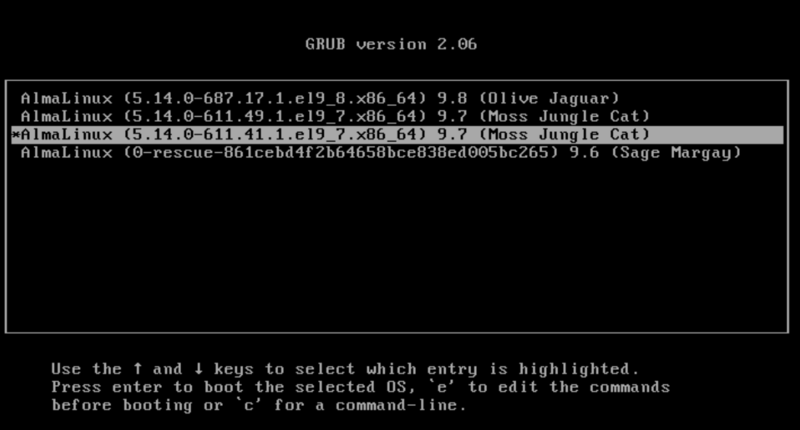
So I had this el9 machine that had been sitting quietly waiting for updates for a bit too long. Blinded by courage, I went in and did a
dnf update, rebooted, and lo and behold, it worked without a hitch
afterwards. Except just one small one: It did not automatically
boot the newest kernel. I tried the standard things. Look at
/etc/default/grub, look at the output of various grubby commands. To
no avail. It simply would not pick up the latest kernel.
It is interesting that I’ve seen this on some systems, but not on all. I suspect that there is a change in grubby or kernel-install or some other script during the lifetime of el9 that made (or fixed) this bug, and it depends on if you ran a kernel-install with the bug. Or strong fluctuations in the karma field. I really don’t know.
I started to dig a bit deeper.
In the old days, we had lilo. In the not so old days, we had grub
version 1. It had simple configuration file menu.lst. With grub
version 2 it became more complicated. The configuration is a whole
tree of files, and it is generally adviced against touching that by
hand. Rather use the macros in /etc/default/grub, and let the system
regenerate the files from there. Except it is even more complex than
that.
el9 uses The UAPI Boot Loader Specification,
or just bls for short. It is a freedesktop/systemd thingie (yeah,
systemd is everywhere these days). It uses fragments of the boot
configurations, generated and stored in /boot/loader/entries,
typically one for each kernel. Red Hat and derivates names these by
some hash on the title of the boot entry added by the package system,
typically the name, and the dot-release of the OS, like “AlmaLinux 9.8
(Olive Jaguar)” being hashed to ee0580234a234c7cab4be65ee152e73f for a
recent AlmaLinux release.
When the package manger installs a new kernel, the grub tools build a full configuration based on the bls fragments. Those are sorted on the filename, and not the title. Which as said, is just a hash. Which means that the new kernel may not become the index-0 kernel that typically is the default boot kernel.
As long as you have kernel from within a dot-release, like “AlmaLinux 9.8 (Olive Jaguar)”, the kernel install tool will sort the bls- fragments in the expected order, by version: Because the title and dot-release is the same, the hash is the same, and the tool will go on to sort by the version number. It actually uses an rpm tool, comparing name-version-release.
Bonus problem: If you remove an old kernel from an earlier dot-release,
typically using rpm -e or dnf remove, the entry fragments are
not necessary cleaned up properly, and you may end up with a broken
system with boot entries pointing to a non-installed kernel.
To fix this, start with changing /etc/default/grub, and add/change
these options:
GRUB_TIMEOUT=5
GRUB_TIMEOUT_STYLE=menu
and then run
grub2-mkconfig -o /boot/grub2/grub.cfg
to deploy those changes.
If you end up with grub trying to boot an entry that does not point to an installed kernel, this will give you 5 seconds on the console to manually select another entry from the grub menu.
Now check that you only have kernels within a dot release
installed. Remove (dnf remove) old kernel packages from the old
dot-release, for example:
dnf remove kernel-core-5.14.0-503.16.1.el9_5.x86_64
To check and clean up if you have dead entries in the boot loader, do:
awk '/^linux/  { print $2}' /boot/loader/entries/* |\
  while read i; do ls "$i" > /dev/null; done
If you get missing files, like
ls: cannot access '/boot/vmlinuz-5.14.0-503.16.1.el9_5.x86_64': No such file or directory
then remove the entry fragment file(s) pointing to that kernel.
grep -l 5.14.0-503.16.1.el9_5.x86_64 /boot/loader/entries/*
/boot/loader/entries/0510df42e58a415fa231e736f98e76b3-5.14.0-503.16.1.el9_5.x86_64.conf

rm /boot/loader/entries/0510df42e58a415fa231e736f98e76b3-5.14.0-503.16.1.el9_5.x86_64.conf
Reinstall the kernel to force the necessary tools to regenerate the boot configuration “the correct” way:
dnf reinstall kernel-core-`uname -r`
Run grubby to check the result
grubby --info=ALL
If you are lucky, the correct boot image is now on the top of the list. Set the boot index to 0, reboot, and you are done.
grubby --set-default-index=0
reboot
If you are unlucky with the hashing, the top entry is now a rescue image. You probably don’t want to remove that. If you get this, the only way out is to either maintain the default index manually for every kernel update, or manually change the names of the fragments and their corresponding files (probably rather error prone), or do the grubby-bls trick noted below.
To fix the problem permanently (or at least until Red Hat updates the
grubby package), you may consider doing a small change in
/usr/libexec/grubby/grubby-bls:
Edit /usr/libexec/grubby/grubby-bls, and look for the command
rpm-sort. Change the sort call from
rpm-sort -c rpmnvrcmp
to
rpm-sort -c vers-nvr-cmp
and it will sort on the version first, and not the name of the fragment file. As the rescue images are tagget with version “0”, they will get at the bottom of the list.
Reinstall the kernel again, and then check the generated configuration:
dnf reinstall kernel-core-`uname -r`
grubby --info=ALL
Finally, it should now have sorted the kernels correctly. Set the index to 0 and reboot.
grubby --set-default-index=0
reboot
Conclusion: There do exist som strange bug in how grub and the surrounding tools are arranging kernels for booting. This post tries to throw a little light on the process, and proposes a fix for anyone facing the same problem.
Redpill Linpro is the Open Source leader in the Nordics, helping customers with the digital transformation since back in the nineties.
Changelog
- 2026-06-26: Posted