

Serverless containers are a great way to run a small site: you push an image, you get an HTTPS URL, and you don’t pay for resources when nobody is accessing your application. What you don’t get is caching close to the client, or protection from the cold-start penalty every time a visitor arrives after the serverless container has spun down.
That is exactly what a CDN is for and an excellent choice for this is Varnish CDN which lets you keep
all of your infrastructure in Europe. In this post we wire up the whole thing,
container, CDN and DNS, in one OpenTofu configuration (main.tf) using the
varnish/varnish provider, together with the Scaleway
provider.
The focus of this post is the Varnish CDN side, how it is wired to the origin, and how it gets its domain and certificate. For the serverless container part, I will use Scaleway, but keep the explanation to the minimum. You can swap it for your own origin and DNS provider if you like.
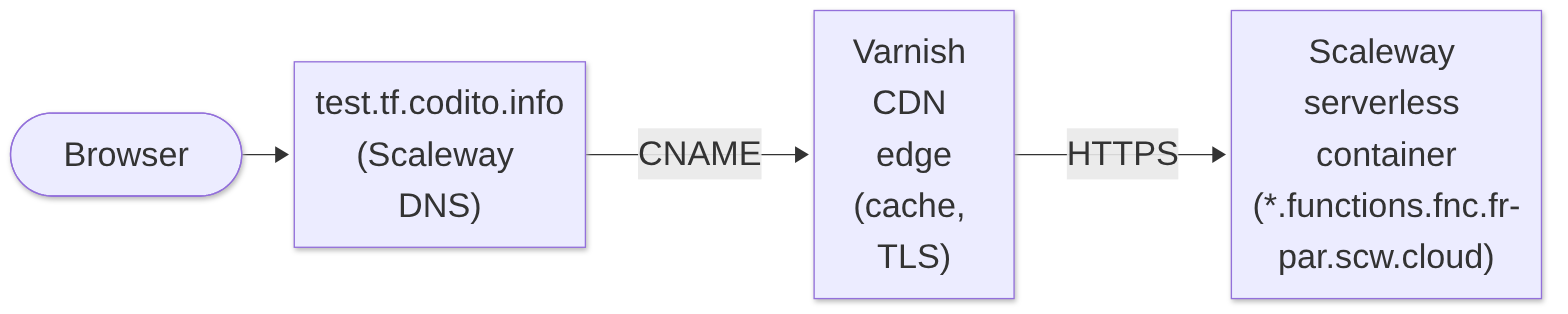
By the end, https://test.tf.codito.info/ is served by Varnish CDN, cached at
the edge, with an automatically issued TLS certificate, and the origin is a
Scaleway serverless container that can scale to zero.
What you need
- OpenTofu 1.8 or newer.
- A Varnish CDN account and an API access token. Sign up here
- A Scaleway project with an API key, and a DNS zone managed by Scaleway
(here
tf.codito.info).
Creating a Varnish CDN API token
- Log in with the one-time link sent to your email, then select your organization (or create one).
- Open the account menu in the top right corner (the black circle with a small avatar) and select Settings.
- Select Tokens in the left-hand menu.
- Click Create API token. Copy the token right away and keep it somewhere safe, such as a password manager.
The token is what VARNISH_ACCESS_TOKEN is set to below.
Credentials stay out of the code. Both providers read them from the environment:
export VARNISH_ACCESS_TOKEN=...
export SCW_ACCESS_KEY=...
export SCW_SECRET_KEY=...
export SCW_DEFAULT_PROJECT_ID=...
Providers
Because the Varnish provider is on the OpenTofu registry, there is nothing to
build or override: declare it and tofu init fetches it.
terraform {
  required_version = ">= 1.8"

  required_providers {
    varnish = {
      source  = "varnish/varnish"
      version = "~> 0.1.1"
    }
    scaleway = {
      source  = "scaleway/scaleway"
      version = "~> 2.87"
    }
  }
}

provider "varnish" {}

provider "scaleway" {
  region = "fr-par"
}
A few variables keep the hostnames in one place:
variable "dns_zone" {
  type    = string
  default = "tf.codito.info"
}

variable "subdomain" {
  type    = string
  default = "test"
}

locals {
  fqdn = "${var.subdomain}.${var.dns_zone}"
  # public_endpoint is a URL; the CDN origin wants a bare hostname.
  origin_host = trimsuffix(trimprefix(scaleway_container.site.public_endpoint, "https://"), "/")
}
Step 1: the origin
To setup the serverless container any image exposing a HTTP endpoint will do. I use originserver, a small Go HTTP server built for exactly this kind of demo: something to put behind a cache and watch how it behaves.
resource "scaleway_container_namespace" "site" {
  name = "codito-site"
}

resource "scaleway_container" "site" {
  name                   = "codito-site"
  namespace_id           = scaleway_container_namespace.site.id
  image                  = "ghcr.io/ullgren/originserver:sha-ae529bc"
  port                   = 8080
  cpu_limit              = 140
  memory_limit_bytes     = 256 * 1024 * 1024
  min_scale              = 0
  max_scale              = 2
  privacy                = "public"
  https_connections_only = true
}
min_scale = 0 is the point of going serverless: no traffic, no cost. The CDN
is what makes that acceptable, because cached responses never wake the
container.
Step 2: the CDN service
The CDN service ties my desired hostname to the container. Two details matter:
- The origin is reached over TLS on port 443, since the container is configured to only accept HTTPS (see above).
host_headermust be the container’s own hostname. Scaleway routes requests byHost; if the CDN forwardedtest.tf.codito.info, Scaleway would not know which container you mean.
resource "varnish_cdn_service" "site" {
  domain {
    fqdn = local.fqdn
    tls  = true
  }

  origin {
    name        = "default"
    host        = local.origin_host
    port        = 443
    enable_tls  = true
    is_default  = true
    host_header = local.origin_host
  }

  settings = {
    general = {
      enable_cacheable_ttl_override = true
      cacheable_ttl_override        = "5m"
    }
  }
}
settings maps to the CDN’s configuration wizard. You only set the fields you
care about; everything else keeps the service’s current value and never shows up
as drift. Here we cache cacheable responses for five minutes regardless of what
the origin says. The full list of fields is in the
provider documentation.
Step 3: DNS at Scaleway
The CDN needs three records before it will serve the domain:
| Record | Why |
|---|---|
CNAME test → <service>.cdn… |
Sends traffic to the CDN edge. |
TXT with a verification token |
Proves you own the domain. |
CNAME _acme-challenge.test → … |
Lets the CDN complete the ACME DNS challenge and issue the TLS certificate. |
You don’t have to copy any of those values from a UI. The
varnish_cdn_domain_dns data source returns the expected values, and tofu feed
them straight into scaleway_domain_record:
data "varnish_cdn_domain_dns" "site" {
  service_id = varnish_cdn_service.site.id
  fqdn       = local.fqdn
}

resource "scaleway_domain_record" "cname" {
  dns_zone = var.dns_zone
  name     = var.subdomain
  type     = "CNAME"
  data     = "${data.varnish_cdn_domain_dns.site.expected_cname}."
  ttl      = 60
}

resource "scaleway_domain_record" "verify" {
  dns_zone = var.dns_zone
  name     = ""
  type     = "TXT"
  data     = data.varnish_cdn_domain_dns.site.expected_txt
  ttl      = 60
}

resource "scaleway_domain_record" "acme" {
  dns_zone = var.dns_zone
  name     = "_acme-challenge.${var.subdomain}"
  type     = "CNAME"
  data     = "${data.varnish_cdn_domain_dns.site.expected_acme_cname}."
  ttl      = 60
}
Two things worth knowing:
- The trailing dot. The data source returns plain hostnames; Scaleway wants
CNAME targets fully qualified, so I have to append
.. Check the documentation for your DNS provider if that is true or not in your case. - Where the TXT goes. A name that carries a CNAME cannot carry any other
record, so the TXT cannot live on
test.tf.codito.info. The CDN also looks for the token on every parent name, so I put it on the zone apex,tf.codito.info.
How the values flow between the resources
The nice part of doing this in one configuration is that no value is ever copied by hand. Each resource hands what it learned to the next one through references, and OpenTofu turns those references into the order it creates things in:
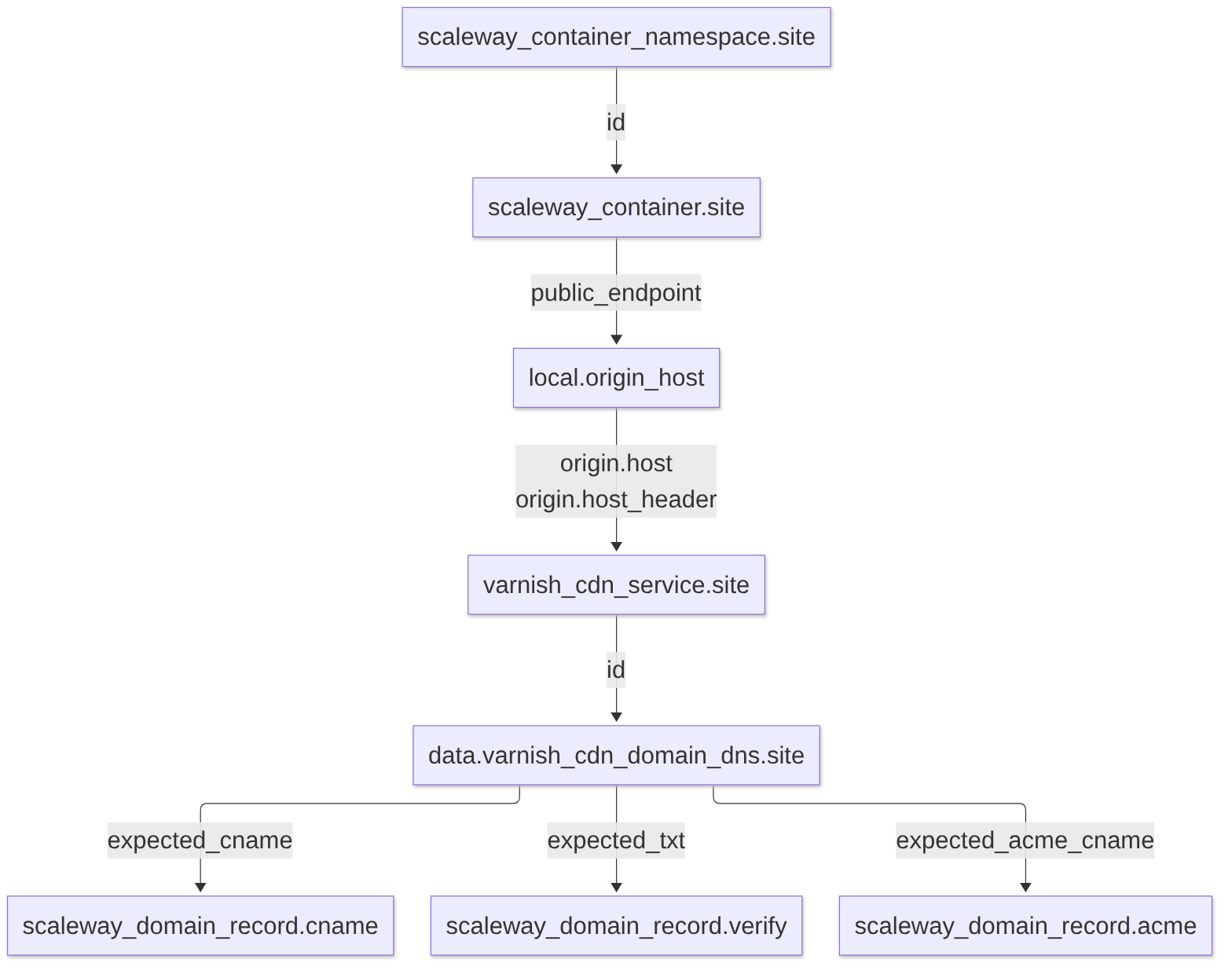
From the container to the CDN service
Scaleway picks the container’s hostname when it creates it, so I cannot know
it in advance. After creation, scaleway_container.site exposes it as
public_endpoint, a full URL:
public_endpoint = "https://coditositeeb5ecddb-codito-site.functions.fnc.fr-par.scw.cloud"
The CDN’s origin block wants a bare hostname, so local.origin_host strips
the scheme and any trailing slash:
origin_host = trimsuffix(trimprefix(scaleway_container.site.public_endpoint, "https://"), "/")
and the CDN service uses that local twice, as the address to connect to and as
the Host header to send:
origin {
  host        = local.origin_host
  host_header = local.origin_host
  # ...
}
Because varnish_cdn_service.site refers to the containers public endpoint (through the local),
OpenTofu will not create the CDN service until the container exists and its
endpoint is known. In tofu plan you can see this as (known after apply) on
the origin:
origin {
    host        = (known after apply)
    host_header = (known after apply)
    port        = 443
    ...
}
After apply, the service’s origin holds the real container hostname:
origin {
    host        = "coditositeeb5ecddb-codito-site.functions.fnc.fr-par.scw.cloud"
    host_header = "coditositeeb5ecddb-codito-site.functions.fnc.fr-par.scw.cloud"
    port        = 443
    ...
}
From the CDN service to the DNS records
The CDN in turn decides the values my DNS needs: which generated hostname to point the CNAME at, which token proves I own the domain, and where to delegate the ACME challenge. None of that exists until the service is created.
The varnish_cdn_domain_dns data source asks the CDN for exactly those values.
It takes the service’s id and my service domain :
data "varnish_cdn_domain_dns" "site" {
  service_id = varnish_cdn_service.site.id
  fqdn       = local.fqdn
}
Since service_id is only known once the service exists, OpenTofu postpones
reading the data source until then, and says so in the plan:
# data.varnish_cdn_domain_dns.site will be read during apply
# (config refers to values not yet known)
When it is read, it returns the values the CDN expects to find in DNS:
| Data source attribute | Value in our run | Used by |
|---|---|---|
expected_cname |
bountiful-street.cust.varnish-cdn.net |
scaleway_domain_record.cname |
expected_txt |
_varnish-cdn-verify=… |
scaleway_domain_record.verify |
expected_acme_cname |
_acme-challenge.cust.varnish-cdn.net |
scaleway_domain_record.acme |
The three scaleway_domain_record resources reference those attributes in
their data field, so they are created last, and in parallel since they don’t
depend on each other.
The resulting order
Put together, tofu apply walks the chain from start to end. From our run:
scaleway_container_namespace.site: Creation complete after 6s
scaleway_container.site: Creation complete after 16s
varnish_cdn_service.site: Creation complete after 10s [id=2003485451]
data.varnish_cdn_domain_dns.site: Read complete after 2s
scaleway_domain_record.acme: Creation complete after 0s
scaleway_domain_record.cname: Creation complete after 0s
scaleway_domain_record.verify: Creation complete after 0s
I never have to explicitly define what depends on what: the references alone tell OpenTofu what has to happen first. The same graph, walked backwards, gives the teardown order.
Outputs
Finally, some outputs to see what was created.
output "url" {
  value = "https://${local.fqdn}/"
}

output "origin" {
  value = "https://${local.origin_host}/"
}

output "cdn_cname" {
  value = data.varnish_cdn_domain_dns.site.expected_cname
}
Run it
tofu init
tofu plan
tofu apply
init pulls both providers from registry.opentofu.org and writes
.terraform.lock.hcl. Commit that file so everyone gets the same provider
builds.
plan will show you what will be applied so that you can validate it before applying.
apply creates six resources and ends with the outputs:
Apply complete! Resources: 6 added, 0 changed, 0 destroyed.

Outputs:

cdn_cname = "bountiful-street.cust.varnish-cdn.net"
origin = "https://coditositeeb5ecddb-codito-site.functions.fnc.fr-par.scw.cloud/"
url = "https://test.tf.codito.info/"
Those are also the three ways to reach the same container: directly at Scaleway
(origin), through the CDN on its generated hostname (cdn_cname), and
through the CDN on our own domain (url). Let’s try all three, using
originserver’s /time page, which waits one second before it answers.
Straight to the container
$ curl -I https://coditositeeb5ecddb-codito-site.functions.fnc.fr-par.scw.cloud/time
HTTP/2 200
content-length: 475
content-type: text/html; charset=utf-8
date: Wed, 21 Oct 2026 20:54:37 GMT
x-envoy-upstream-service-time: 1009
server: envoy

$ curl -I https://coditositeeb5ecddb-codito-site.functions.fnc.fr-par.scw.cloud/time
HTTP/2 200
content-length: 475
content-type: text/html; charset=utf-8
date: Wed, 21 Oct 2026 20:54:41 GMT
x-envoy-upstream-service-time: 1006
server: envoy
server: envoy and x-envoy-upstream-service-time come from the Envoy proxy
Scaleway runs in front of every serverless container. The latter is how long
the container took to answer, in milliseconds: our one-second delay, every
single time. Nothing here is cached.
Through the CDN
The CDN hostname works as soon as the service is deployed, even before your own DNS records have propagated, so it is handy for a first test:
$ curl -I https://bountiful-street.cust.varnish-cdn.net/time
HTTP/2 200
content-length: 475
content-type: text/html; charset=utf-8
date: Wed, 21 Oct 2026 20:52:43 GMT
x-envoy-upstream-service-time: 1011
server: envoy
x-varnish: 59517410
age: 0
via: 1.1 varnish (Varnish/6.0)
strict-transport-security: max-age=31536000; includeSubDomains; preload
accept-ranges: bytes

$ curl -I https://bountiful-street.cust.varnish-cdn.net/time
HTTP/2 200
content-length: 475
content-type: text/html; charset=utf-8
date: Wed, 21 Oct 2026 20:52:43 GMT
x-envoy-upstream-service-time: 1011
server: envoy
x-varnish: 58463684 56565053
age: 7
via: 1.1 varnish (Varnish/6.0)
strict-transport-security: max-age=31536000; includeSubDomains; preload
accept-ranges: bytes
Once DNS is in place (dig +short CNAME test.tf.codito.info should return
the cdn_cname), the same thing works on our own domain, with a certificate
the CDN issued for it:
$ curl -I https://test.tf.codito.info/
HTTP/2 200
content-length: 622
content-type: text/html; charset=utf-8
date: Wed, 21 Oct 2026 20:55:04 GMT
x-envoy-upstream-service-time: 6
server: envoy
x-varnish: 57871616
age: 0
via: 1.1 varnish (Varnish/6.0)
strict-transport-security: max-age=31536000; includeSubDomains; preload
accept-ranges: bytes

$ curl -I https://test.tf.codito.info/
...
x-varnish: 58537368 51351008
age: 2
...

$ curl -I https://test.tf.codito.info/
...
x-varnish: 59321552 51351008
age: 6
...
Reading the headers
age is the key one. It is the number of seconds the response has been
sitting in the cache (RFC 9111).
age: 0means the response is fresh from the origin: this request was a cache miss, and the CDN had to ask the container.age: 7means the CDN answered from a copy it stored seven seconds earlier. The container was never contacted, so this request did not wait a second for/time, and a container scaled to zero would not have been woken up.
The age keeps growing on every hit (2, 6, …) until it reaches the TTL, five
minutes with our cacheable_ttl_override. Then the copy expires, the next
request is a miss with age: 0 again, and the cycle restarts. Browsers and
other caches downstream use age too: they subtract it from the TTL, so a copy
never lives longer in total than the origin (or the CDN configuration)
allowed.
The other headers back up the story:
x-varnishholds the ID of the current request. On a hit it has a second number, the ID of the request that originally stored the object. Notice that both hits ontest.tf.codito.infoend in51351008: they were served from the same stored copy.dateandx-envoy-upstream-service-timeare frozen on a hit. The second CDN request for/timestill says20:52:43and1011ms, because those headers are part of the stored response, not a new answer from the container. Compare that with the direct requests, where both change every time.via: 1.1 varnishmarks that the response passed through the CDN; the direct requests to Scaleway don’t have it.
Images make the cache visible in the browser too. Open
https://test.tf.codito.info/images/mandelbrot and reload: straight from the
container every reload renders a new fractal, through the CDN you get the same
picture until the cached copy expires.
If the domain stays unverified, re-run tofu apply (or tofu refresh) and look
at the data source: valid_cname, valid_txt, valid_acme_cname and
verified tell you which record the CDN does not see yet.
Tear it down
Everything we created is in OpenTofu’s state, so removing it is one command:
tofu destroy
OpenTofu first refreshes the state, reading every resource back from Scaleway and the CDN to make sure it is deleting what actually exists:
scaleway_container_namespace.site: Refreshing state... [id=fr-par/eb5ecddb-...]
scaleway_container.site: Refreshing state... [id=fr-par/d04339fd-...]
varnish_cdn_service.site: Refreshing state... [id=2003485451]
data.varnish_cdn_domain_dns.site: Reading...
data.varnish_cdn_domain_dns.site: Read complete after 2s
scaleway_domain_record.cname: Refreshing state... [id=tf.codito.info/560e9584-...]
scaleway_domain_record.acme: Refreshing state... [id=tf.codito.info/2c0b7a16-...]
scaleway_domain_record.verify: Refreshing state... [id=tf.codito.info/a708b461-...]
It then prints a plan in which every resource is marked for destruction, and asks for confirmation:
Plan: 0 to add, 0 to change, 6 to destroy.

Changes to Outputs:
  - cdn_cname = "bountiful-street.cust.varnish-cdn.net" -> null
  - origin    = "https://coditositeeb5ecddb-codito-site.functions.fnc.fr-par.scw.cloud/" -> null
  - url       = "https://test.tf.codito.info/" -> null

Do you really want to destroy all resources?
  OpenTofu will destroy all your managed infrastructure, as shown above.
  There is no undo. Only 'yes' will be accepted to confirm.

  Enter a value: yes
Read the plan before you type yes. As a bonus, the CDN service’s entry shows
the complete effective configuration, not just the two settings we wrote:
defaults such as https_redirect = true, hsts = true and
enable_stale_if_error = true came from the wizard template. That is the
“track the server” behaviour of settings in action.
The interesting part is the order:
scaleway_domain_record.verify: Destroying... [id=tf.codito.info/a708b461-...]
scaleway_domain_record.cname: Destroying... [id=tf.codito.info/560e9584-...]
scaleway_domain_record.acme: Destroying... [id=tf.codito.info/2c0b7a16-...]
scaleway_domain_record.cname: Destruction complete after 1s
scaleway_domain_record.acme: Destruction complete after 1s
scaleway_domain_record.verify: Destruction complete after 1s
varnish_cdn_service.site: Destroying... [id=2003485451]
varnish_cdn_service.site: Destruction complete after 0s
scaleway_container.site: Destroying... [id=fr-par/d04339fd-...]
scaleway_container.site: Destruction complete after 0s
scaleway_container_namespace.site: Destroying... [id=fr-par/eb5ecddb-...]
scaleway_container_namespace.site: Destruction complete after 6s

Destroy complete! Resources: 6 destroyed.
It is apply in reverse. OpenTofu knows the dependencies from the references
in the code: the DNS records use values from the CDN service, the CDN service
points at the container, and the container lives in the namespace. So it
deletes from the outside in:
- DNS records first, in parallel since they don’t depend on each other.
test.tf.codito.infostops pointing at the CDN before the CDN service disappears. Resolvers may still hold the old CNAME for up to the 60 second TTL, so a few last requests can still reach the CDN. - The CDN service, which also releases the domain and its certificate.
- The container, now that nothing sends traffic to it.
- The namespace, which must be empty before Scaleway lets you delete it.
Wrapping up
About a hundred lines of HCL give you a custom domain, edge caching, automatic
TLS, and an origin, with no values copied by hand
between three different consoles. Swap originserver for your own image and
point subdomain at something real, and you have a production-shaped setup.
Appendix: the complete main.tf
Everything shown above comes together in one file. Expand it to copy and adapt:
The complete main.tf
terraform {
  required_version = ">= 1.8"

  required_providers {
    varnish = {
      source  = "varnish/varnish"
      version = "~> 0.1.1"
    }
    scaleway = {
      source  = "scaleway/scaleway"
      version = "~> 2.87"
    }
  }
}

# Credentials come from the environment, see setenv.sh.example:
# VARNISH_ACCESS_TOKEN
# SCW_ACCESS_KEY / SCW_SECRET_KEY / SCW_DEFAULT_PROJECT_ID.
provider "varnish" {}

provider "scaleway" {
  region = "fr-par"
}

variable "dns_zone" {
  type        = string
  description = "Scaleway-managed DNS zone the site lives in."
  default     = "tf.codito.info"
}

variable "subdomain" {
  type        = string
  description = "Label inside dns_zone that the CDN serves."
  default     = "test"
}

locals {
  fqdn = "${var.subdomain}.${var.dns_zone}"
  # public_endpoint is a URL; the CDN origin wants a bare hostname.
  origin_host = trimsuffix(trimprefix(scaleway_container.site.public_endpoint, "https://"), "/")
}

# ---------------------------------------------------------------------------
# Origin: a Scaleway serverless container
# ---------------------------------------------------------------------------
resource "scaleway_container_namespace" "site" {
  name = "codito-site"
}

resource "scaleway_container" "site" {
  name                   = "codito-site"
  namespace_id           = scaleway_container_namespace.site.id
  image                  = "ghcr.io/ullgren/originserver:sha-ae529bc"
  port                   = 8080
  cpu_limit              = 140
  memory_limit_bytes     = 256 * 1024 * 1024
  min_scale              = 0
  max_scale              = 2
  privacy                = "public"
  https_connections_only = true
}

# ---------------------------------------------------------------------------
# CDN service in front of the container
# ---------------------------------------------------------------------------
resource "varnish_cdn_service" "site" {
  domain {
    fqdn = local.fqdn
    tls  = true
  }

  origin {
    name       = "default"
    host       = local.origin_host
    port       = 443
    enable_tls = true
    is_default = true
    # Scaleway routes on Host, so it must be the container's own domain.
    host_header = local.origin_host
  }

  settings = {
    general = {
      enable_cacheable_ttl_override = true
      cacheable_ttl_override        = "5m"
    }
  }
}

data "varnish_cdn_domain_dns" "site" {
  service_id = varnish_cdn_service.site.id
  fqdn       = local.fqdn
}

# ---------------------------------------------------------------------------
# DNS in Scaleway
# ---------------------------------------------------------------------------
resource "scaleway_domain_record" "cname" {
  dns_zone = var.dns_zone
  name     = var.subdomain
  type     = "CNAME"
  data     = "${data.varnish_cdn_domain_dns.site.expected_cname}."
  ttl      = 60
}

# Ownership TXT sits on the zone apex: a CNAME label cannot carry other
# records, and the CDN also accepts the token on any parent name.
resource "scaleway_domain_record" "verify" {
  dns_zone = var.dns_zone
  name     = ""
  type     = "TXT"
  data     = data.varnish_cdn_domain_dns.site.expected_txt
  ttl      = 60
}

resource "scaleway_domain_record" "acme" {
  dns_zone = var.dns_zone
  name     = "_acme-challenge.${var.subdomain}"
  type     = "CNAME"
  data     = "${data.varnish_cdn_domain_dns.site.expected_acme_cname}."
  ttl      = 60
}

output "url" {
  value = "https://${local.fqdn}/"
}

output "origin" {
  value = "https://${local.origin_host}/"
}

output "cdn_cname" {
  value = data.varnish_cdn_domain_dns.site.expected_cname
}