11249

Creating an Autonomous CRM Incident Investigator with Nova

This article explains how to use Nova Pro v1 as an autonomous CRM incident investigator that debugs lead source anomalies by reasoning through a bounded tool set and knowing what to use and when to stop. Although the example targets enterprises with data on AWS, the same framework applies to any data platform.


Introduction

I have spent a significant part of my career working closely with CRM data. And if there is one thing that never stopped being frustrating, it is this: the moment an alert fires telling you a lead source has dropped, you already know the hard part is not the detection. The hard part is everything that comes after it.

In this article, I wanted to look at this from a closer angle.
Showing Problem

The Problem

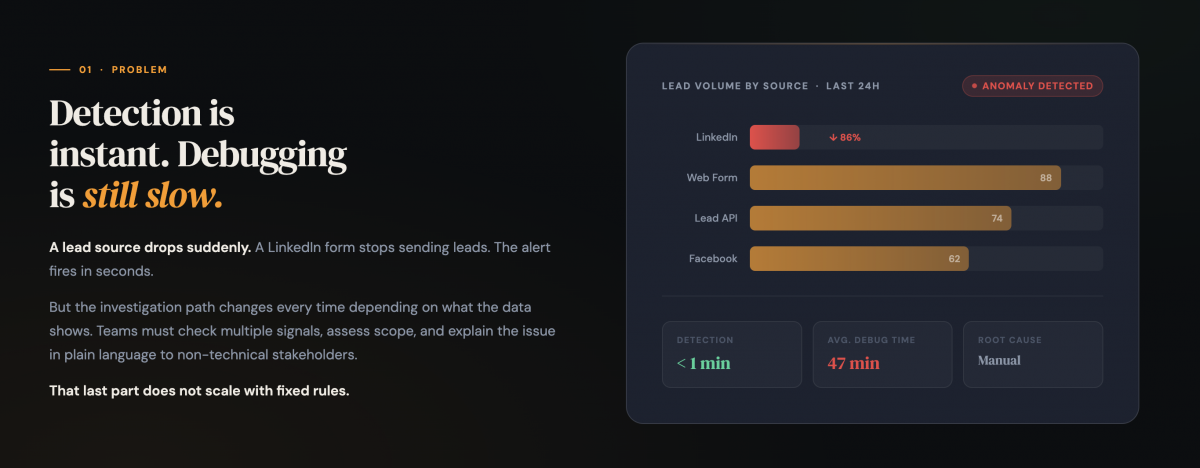
The pattern was always the same: Leads from X source from Germany drop overnight. The alert fires. You open your SQL client, start forming hypotheses, and run the first query. The result changes the next hypothesis. You run another query. Then another. Is the drop isolated to Germany or is it hitting the same source across other markets too? Did the pipeline fail at a specific timestamp or was it gradual? Is it a form-level issue or something in the broader source family? 

Every incident looked similar on the surface. The investigation underneath was always different. You could not write a fixed rule that covered all of them because the right path depended entirely on what the data showed. 

And then, once you had your answer, you had to explain it. Operations, sales, leadership. They needed to act on it, which meant you needed to translate query results into plain language that was accurate, clear, and fast. That translation happened every time. It was repetitive, it was time consuming, and there was no way to generalize it with rules.

I started thinking about this project not as a hackathon submission but as a solution to something that had genuinely bothered me for years.
The Solution

The Solution

The Autonomous CRM Incident Investigator is an agentic system built on Amazon Nova Pro V1 through Amazon Bedrock, with Amazon Athena handling the query execution.

The detection step is straightforward SQL. A preparatory query compares the last 28 days of CRM data against the most recent 7 days and flags any source and country combination with a volume drop above 50%. That part does not need a language model.

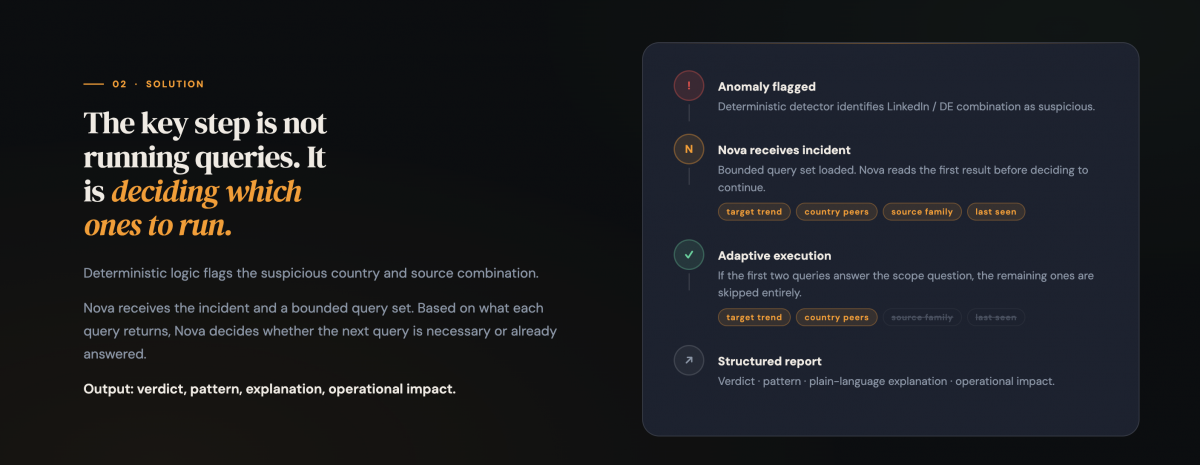
What happens next does. Each flagged anomaly is passed to Nova Pro V1 along with a bounded set of pre-registered Athena Named Queries. The key word is bounded. Nova does not get access to arbitrary SQL. It gets access to exactly the queries that matter for this class of incident: day-by-day volume trend, country peer volumes, source family peers across other countries, last-seen timestamp, and a row-level sample for final inspection.

Nova reads the result of each query before deciding whether to call the next one. If the first two queries establish that the drop is country-wide, the source-family query adds nothing. Nova skips it. If the evidence points somewhere unexpected, it continues. The path is shaped by the data, not by hard-coded branching logic written in advance by a human who cannot anticipate every scenario.

Session memory carries findings across anomaly iterations within the same detection cycle. If Nova confirms a multi-country weakness on the first flagged source, subsequent investigations for the same source family skip the peer analysis entirely. The system does not repeat work it has already done.

The output is a strictly typed JSON verdict: root cause, pattern classification, plain-language explanation, and operational impact. Ready to hand to anyone, technical or not.
Demo

Demo

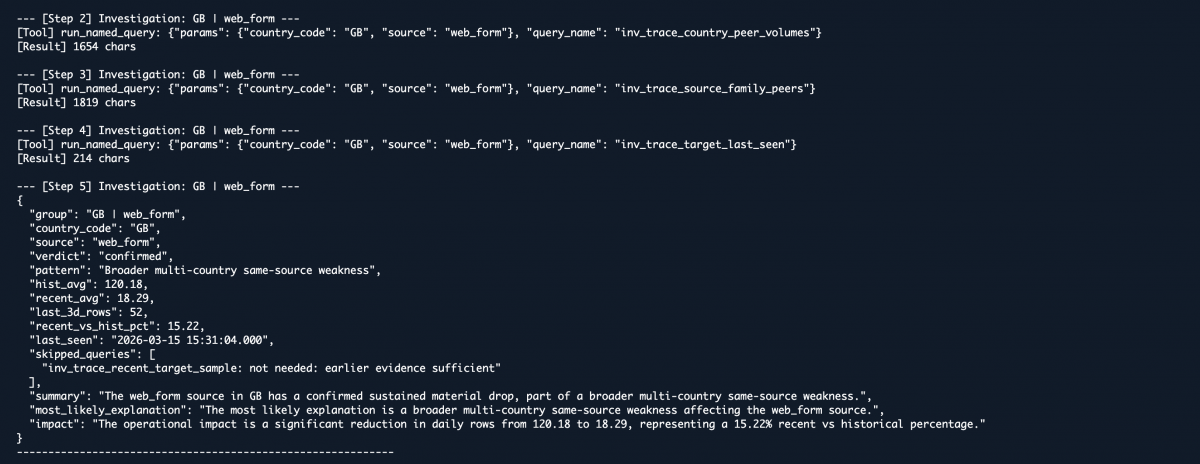
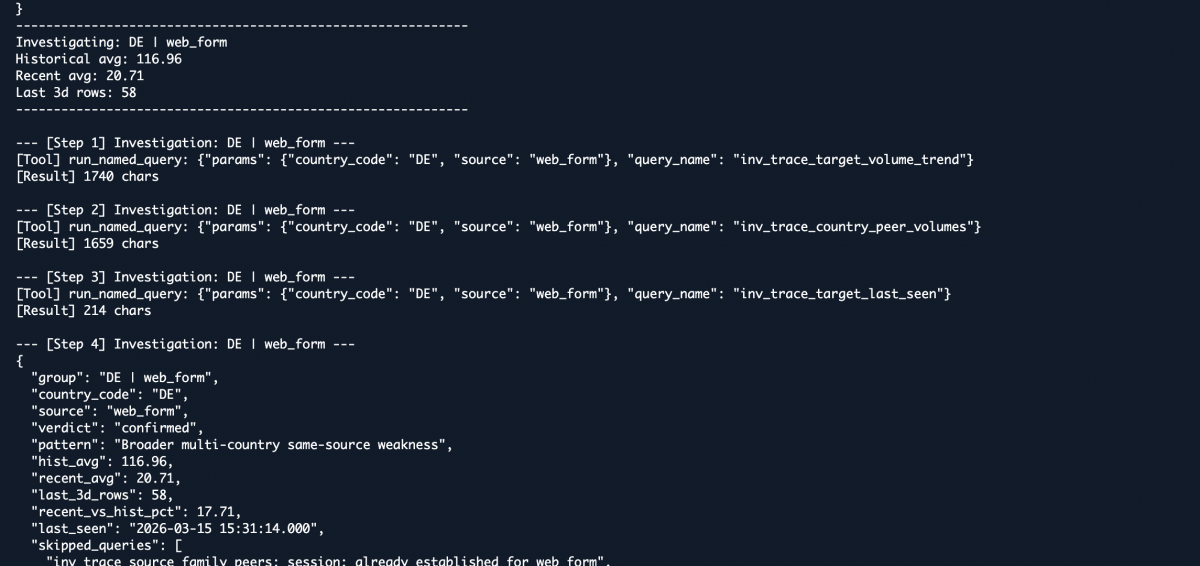
The demo runs against a synthetic dataset of 500,000 CRM lead records spanning five months, with two deliberate anomalies injected into the final week. The first is isolated: FR | LinkedinForm goes to zero overnight. The second is broader: GB | web_form and DE | web_form both drop 85%, representing a multi-country source family failure.

For the French anomaly, Nova runs the full path. It traces the trend, checks peer sources within France, examines the source family across other markets, and extracts the exact timestamp the pipeline stopped.

For the German anomaly, which follows in the same detection cycle, Nova identifies early that the drop pattern matches the multi-country weakness already established for GB | web_form. The source-family query is skipped. 
Fewer steps, same quality of verdict.

That is what the demo is designed to show. Not that the system can call a query. That it can stop calling one when the evidence already answers the next question.

Demo link: https://www.youtube.com/watch?v=jmkgq3DpeTc 
Demo

What This Could Mean for CRM Teams?

The most obvious benefit is time. Mean time to resolution for this class of incident drops from hours to minutes without requiring a data analyst to be available and context-switched every time an alert fires.

But the less obvious benefit is consistency. When a human investigates manually, the quality of the output depends on who is doing it, how much time they have, and how familiar they are with that specific type of anomaly. An autonomous system produces the same structured output every time, regardless of incident volume or hour of day.

The architecture is not limited to lead source monitoring. Any CRM data incident where the hypothesis space can be defined in advance is a candidate: conversion rate anomalies, duplicate record spikes, field-level data quality failures. The tool registration layer is what changes. The agent logic stays the same.

The next step is connecting the detection layer to an existing alerting system so the investigator fires automatically rather than on demand. That closes the loop completely and turns what is currently a tool you run into a system that runs itself.

The source code is public. The stack is Python, Boto3, and active AWS credentials with Bedrock and Athena access. If you are already on AWS, setup takes under thirty minutes.

Github Link: https://github.com/selimsevim/nova-crm-investigator 

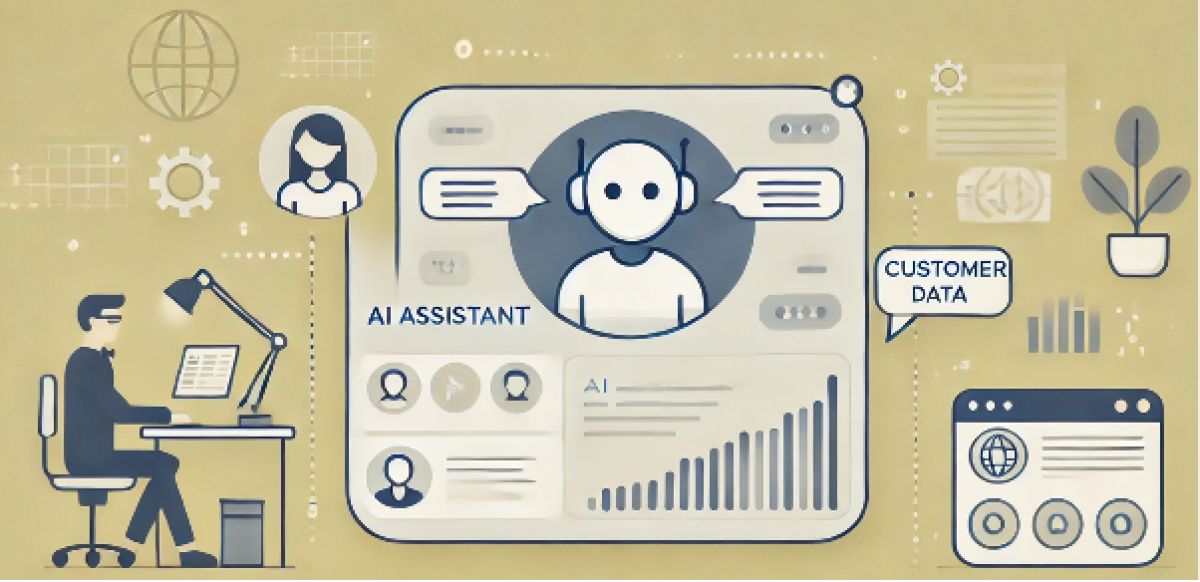
Creating an Autonomous CRM Incident Investigator (AI Generated picture)

Transforming GPT-4o into an AI Query Assistant for SFMC

After recently starting to learn about AI models, prompt engineering, and fine-tuning, I quickly realized that public resources on integrating GPT into Salesforce Marketing Cloud (SFMC) were extremely limited—especially for practical, real-world use cases beyond content generation. 

Most examples focus on generating text-based responses, but SFMC presents a unique landscape where GPT can be leveraged for automation, data extraction, and intelligent querying. There's so much more we can do. 

In this article, I'll walk you through the process of transforming GPT-4o into an AI-powered Query Assistant that can interpret user queries, map them to Data Extensions (DEs), extract relevant fields, and generate SQL queries dynamically. 

By the end, I'll also highlight another AI-driven applications you can build for SFMC—pushing the boundaries of what’s possible with AI in marketing automation. 

Github repo: https://github.com/selimsevim/sfmc-ai-query-assistant

Key Features: What Makes This AI Query Assistant Interesting?

1. Natural Language to Structured Query Understanding 

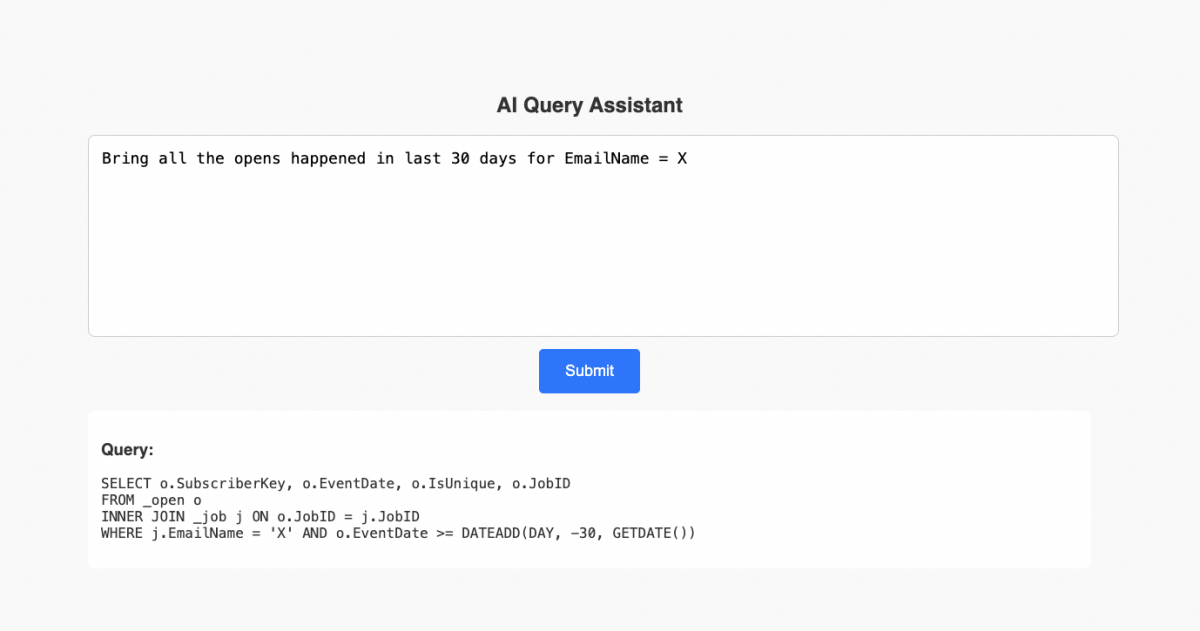
Users can input questions in plain English, like: "Bring all the opens happened in last 30 days for EmailName = X" The assistant intelligently maps this request to the correct Data Extensions (_job, _open) and fields (EventDate, SubscriberKey, etc.) without the user needing to know DE names.

AI Query Assistant

2. Dynamic Data Extension & Field Lookup 

Instead of hardcoding database tables, the assistant dynamically retrieves Data Extension (DE) references and field mappings from lookup tables in SFMC. 

  • It cross-references user input with a DE Reference Table to determine which DEs to query. 
  • It checks a Field Reference Table to infer the correct fields when the user doesn’t specify them explicitly. 

3. Intelligent Query Building with Context Awareness 

The assistant doesn’t just list DEs—it understands relationships between data extensions and constructs queries accordingly with preconfigured data extensions. 

4. SQL Query Generation with Strict Compliance Rules 

  • No unnecessary fields – The assistant only includes the required fields in the SELECT clause. 
  • Strict SQL rules – It enforces correct syntax, prevents invalid clauses (e.g., no CROSS JOIN, no ORDER BY unless inside ROW_NUMBER), and ensures queries are SFMC-compliant. 
  • Joins are handled correctly – If multiple DEs are involved, it references a relationship table to determine the correct JOIN conditions. 

5. Automated De-Duplication 

Handling When users request deduplicated data, the assistant automatically applies ROW_NUMBER() OVER (PARTITION BY … ORDER BY …) inside a subquery, ensuring only the latest or most relevant record is kept.

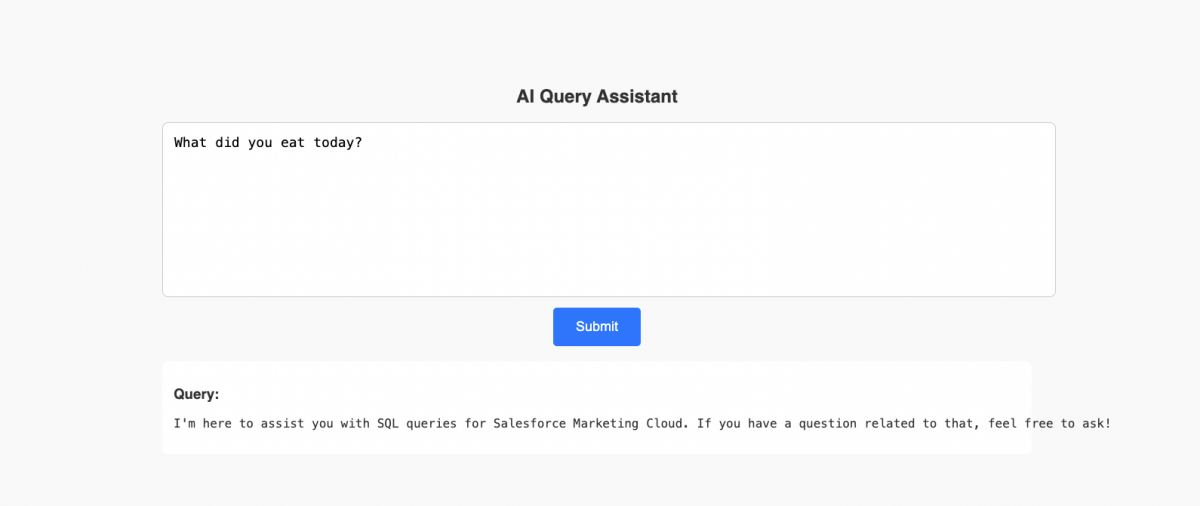
AI Query Assistant 2

Breaking Down the AI Query Assistant: How It Works

User Input & First GPT Call 

When a user enters a query, such as: 💬 "Bring all the opens happened in last 30 days for EmailName = X" 

  • The script extracts possible Data Extensions (DEs) and fields from two sources: 

1- Direct user input (if the user explicitly names DEs or fields). 

2- Lookup tables in SFMC that map user-friendly references to actual DE names and field names. 

Dynamic Lookup for Data Extensions & Fields 

The assistant dynamically retrieves DE and field references from SFMC’s lookup tables: 

1️⃣ DE Reference Table 

• Maps user-friendly terms to actual Data Extension names. 

• Example: The word "opens" might be mapped to "_open". 

2️⃣ Field Reference Table 

• Maps user-friendly terms to actual DE fields. 

• Example: The phrase "Open Date" could map to the "EventDate" field in _click. 

Building the System Prompt for the First GPT Call 

Once the relevant DEs and fields are identified, we send them to GPT-4o using a structured system prompt. The goal is to validate and refine the extracted information before proceeding to SQL generation. 

The GPT system prompt includes: 

✅ User’s input query 

✅ Extracted DEs and fields 

✅ Reference tables for further mapping 

✅ Rules for handling missing DEs or fields 

✅ JSON output format enforcement 

Prompt 

You are an AI that extracts Data Extensions (DEs) and fields from user queries in Salesforce Marketing Cloud. 

### **Your Role:** 

- Identify relevant **Data Extensions (DEs)** based on **explicit user input** OR **mapped references**. 

- Identify **fields** either explicitly mentioned by the user OR inferred from the **Field Reference Table**. 

- If the user explicitly states a DE, prioritize it over reference mappings. 

- If no DEs can be inferred, return: `"Please explain yourself one more time."` 

- If no fields can be inferred, leave the `fields` list empty. 

### **Reference Table (User-Friendly Terms → Data Extensions)** {{deMappings}} 

### **Field Reference Table (User-Friendly Terms → DE & Fields)** {{fieldMappings}} 

### **Output JSON Format (Strictly Follow This)** 

```json 

{ 

"de_names": ["DE1", "DE2", ...], 

"fields": ["Field1", "Field2", ...] 

} 

..... 

Expected GPT Response (First Interaction) 

{ "de_names": ["_job", "_click"], "fields": ["EventDate"] } 

At this point, we have successfully structured the query input and identified all necessary DEs and fields. 

Retrieving All Available Fields for Identified Data Extensions 

Now that we know which DEs we need, the assistant retrieves all fields for those Data Extensions using SFMC’s WSProxy: 

1. It fetches all available columns for each DE. 

2. It stores these fields to be used in the second GPT interaction. 

Fetching Data Extension Relationships 

To ensure proper joins in the SQL query, the script retrieves relationships between DEs. For example, _job and _open are related via JobID. 

Building the System Prompt for the Second GPT Call 

Now that we have: 

✅ User’s refined request 

✅ Final DE and field selection 

✅ All available fields for those DEs 

✅ DE relationships 

We send all this structured data to GPT-4o in the second interaction, instructing it to generate an SQL query. 

The GPT system prompt includes: 

✅ Strict SQL rules (no invalid clauses, optimized query structure) 

✅ Correct table joins using relationship mappings 

✅ Correct field selection (only existing fields, no hallucinations) 

✅ De-duplication rules (if needed) 

✅ Filters based on user query (e.g., last week’s data) 

Prompt 

You are an AI that generates SQL queries for Salesforce Marketing Cloud (SFMC). Only generate the query, do not explain anything. Follow these strict rules: 

### **🔹 SQL Rules (Strict Adherence Required)** 

- **Allowed Clauses:** SELECT, JOIN, WHERE, GROUP BY, HAVING, ROW_NUMBER. 

- **Prohibited Clauses:** INSERT, UPDATE, DELETE, ORDER BY (unless inside `ROW_NUMBER() OVER (...)`), WITH. 

- **Allowed Joins:** INNER JOIN, LEFT JOIN (NO CROSS JOIN). 

- **Field Selection:** Do NOT use `*`. Always list fields explicitly. 

- **Data Extension Naming:** Use square brackets `[ ]` for DEs ALWAYS. 

- **Table Aliases:** Use aliases for readability, but keep full DE names in `FROM` and `JOIN`. 

- **Query Efficiency:** Always optimize queries for readability and performance. 

### **🔹 Data Views Handling Rules** 

- **SFMC Data Views such as `_job`, `_open`, `_click`, `_bounce`, etc., must be handled with proper joins.** 

- **If a user query involves opens, clicks, or sends, extract BOTH `_job` (Emails DE) AND the relevant event DE (`_open`, `_click`, etc.).** 

- **Always JOIN `_job` with event-based Data Views using `JobID` or `SubscriberKey`, based on available relationships.** 

- **Ensure that filters involving email sends, opens, clicks, or bounces use the correct event timestamps (e.g., `EventDate`).** 

...... 

Expected GPT Response (Second Interaction) 

SELECT o.SubscriberKey, o.EventDate, o.IsUnique, o.JobID 

FROM _open o 

INNER JOIN _job j ON o.JobID = j.JobID 

WHERE j.EmailName = 'X' AND o.EventDate >= DATEADD(DAY, -30, GETDATE())

Challenges & Lessons Learned from Building the AI Query Assistant

Building an AI-powered Query Assistant in Salesforce Marketing Cloud (SFMC) comes with its own set of challenges. While the assistant successfully converts natural language into structured SQL queries, there are a few key areas to be mindful of: 

1️⃣ GDPR and Data Privacy 

One important consideration is data privacy. If a user includes personal information in their query, such as: WHERE EmailAddress = 'user@example.com' 

then that data is sent to GPT, potentially violating GDPR or other privacy regulations. 

✅ Solution: Avoid sending PII (Personally Identifiable Information) to GPT or anonymize queries before processing them. 

2️⃣ Approaching Prompts Wisely 

The prompt engineering in this assistant was an experimental approach. While it works well for general SFMC SQL queries, every business has unique data structures and SQL constraints. 

✅ Recommendation: Adapt the prompts to match your company’s SQL rules and SFMC setup. A more precise prompt will yield better results and prevent GPT from making incorrect assumptions. 

3️⃣ Cost Considerations 

Even though GPT-4o is relatively cheap, every API call still costs money. Since this assistant interacts with GPT twice per query, costs can scale up quickly if used frequently. 

✅ Optimization Ideas: 

  • Use caching to avoid redundant queries. 
  • Run pre-checks before calling GPT (e.g., basic SQL templates for common queries). 
  • Only call GPT if the user query is complex enough to need AI processing. 

4️⃣ Handling Data Views More Efficiently 

I didn't focus too much on Data Views (_job, _open, _click, etc.) because they are fixed structures and don't require as much flexibility as other DEs. However, for a production-ready assistant, handling Data Views separately would be beneficial. 

✅ Recommendation: Create a separate GPT prompt with different rules for Data Views because: 

  • Field names and relationships are standardized in SFMC Data Views. 
  • Query structures are predictable (e.g., _job always joins with _open, _click, etc.). 

5️⃣ Better Error Handling 

The current SSJS error handling is scattered and not fully optimized. Different user queries may trigger unexpected responses, and handling errors properly is crucial for production use. 

✅ Solution: Build a structured error-handling system that: 

  • Detects invalid DEs/fields before sending requests to GPT. 
  • Returns clear error messages instead of generic failures. 
  • Logs errors for debugging and future improvements.
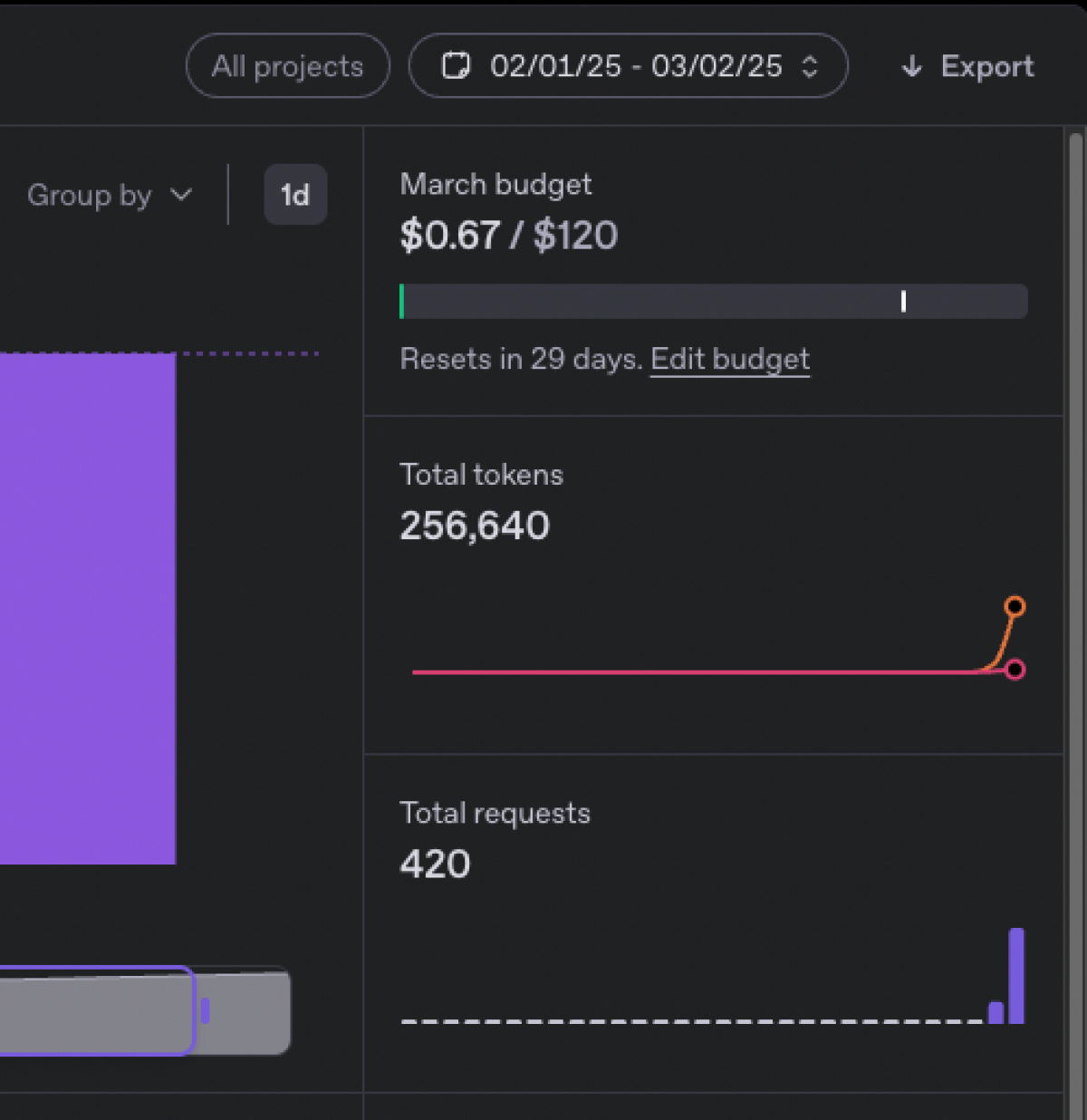
Token and requests
While doing all the tests, I only spent 0.67$.

Exploring Another AI-Powered Use Case in SFMC

Beyond SQL query generation, GPT can be used for other automation tasks in Salesforce Marketing Cloud (SFMC). One such use case is translating natural language instructions into structured JSON actions for managing Data Extensions (DEs). 

This approach allows marketers, admins, and developers to issue commands in plain English, and GPT converts them into structured actionable steps that SFMC can execute. 

📌 Use Case: AI-Powered Data Extension Management 

Instead of manually navigating SFMC’s UI to create, move, copy, or delete Data Extensions, we can build an assistant that understands natural language and generates structured JSON commands for execution. 

How It Works 

1️⃣ The user enters a command like: "Move all DEs having 'Test' in their name to 'Archive'." or "Create a Data Extension by copying 'Customer_DE' but remove all PII fields." 

GPT has a prompt like: 

### **Instructions:** 

1 **Extract the main action type** (create, delete, update, move, copy). 

2 **Identify filter conditions** (contains, starts_with, ends_with, exact). 

3 **Standardize synonyms** (e.g., "starting with" → "starts_with", "having" → "contains"). 

4 **Handle multiple actions** and return them in **sequential order**. 

5 **Always structure actions in this order when applicable**: - (1) `create_folder` → (2) `get_data_extensions` → (3) `move_data_extensions` 

6 **If a folder needs to be created, do not check first. Just create it.** 

7 **Always retrieve Data Extensions before moving them.** 

### **JSON Output Format:** 

```json 

{ 

"actions": [ 

{ "name": "<action_name>", "parameters": { "<param_key>": "<param_value>" } }

    ]

} 

2️⃣ GPT interprets the request and translates it into JSON-based structured actions like: 

{ "actions": [ { "name": "get_data_extensions", "parameters": { "filter": 

{ "type": "contains", "value": "Test" } } }, 

{ "name": "move_data_extensions", "parameters": 

{ "target_folder": "Archive", "data_extensions": ["DE_1", "DE_2"] } } 

    ] 

} 

3️⃣ SFMC executes the actions via SSJS, parsing the JSON and performing the necessary operations.

4️⃣ The user receives a confirmation message: ✅ "All data extensions including 'Test' in their name have been moved to the 'Archive' folder."

Conclusion

Integrating GPT-4o into Salesforce Marketing Cloud (SFMC) opens up new possibilities beyond simple content generation. Through this project, we explored how AI can understand natural language queries, extract relevant Data Extensions and fields, and generate structured SQL queries—helping marketers, developers, and data analysts work more efficiently. 

Beyond SQL generation, we also saw how AI can automate Data Extension management, transforming plain English commands into structured JSON actions that SFMC can execute. These use cases only scratch the surface of what’s possible. 

With careful prompt engineering, performance optimizations, and security considerations, AI can become a valuable assistant for SFMC users—saving time, reducing errors, and making complex tasks more accessible to non-technical users. 

The key takeaway? GPT-4o isn't just a chatbot—it can be a powerful automation tool when structured properly. Whether it's querying data, managing DEs, or handling automation workflows, the right AI implementation can supercharge SFMC operations. 

This project was an experiment, and there's still plenty of room for improvement. If you're looking to build your own AI-powered SFMC tools, I strongly encourage you to tailor prompts to your needs, optimize for cost and accuracy, and always consider security best practices.

Woman and man infront of a computer (AI generated image)

Turning Claude into your Salesforce Marketing Cloud Agent with Playwright MCP (No coding)

The first time I discovered the Playwright library, I was amazed by how much it could simplify repetitive tasks on UI-heavy platforms like Salesforce Marketing Cloud. But with the rise of LLMs, that power has jumped to an entirely new level. (Okay, I may be getting ahead of myself here—so let’s rewind and break it down.)

What is Playwright?

Playwright is an open-source library from Microsoft that lets you automate real browsers. Think of it as a way to script what a human would normally do in Chrome, Firefox, or Safari—clicking buttons, filling out forms, taking screenshots, even testing how a page works on mobile vs desktop.

What is Playwright MCP?

MCP stands for Model Context Protocol. It’s a standard for connecting tools (like Playwright) to language models (like Claude or Copilot). With Playwright MCP, you don’t have to write test scripts yourself—the LLM can “call” Playwright directly, drive the browser for you, and even return screenshots or DOM details. 

So in a way, Playwright MCP feels like the intelligent version of Playwright. Instead of you coding the steps, the model interprets your request—“log into Marketing Cloud, open Email Studio, and take a screenshot”—and makes it happen. 

Alright, enough theory — let’s get to the cool part.

(Disclaimer: I did this demo using a Claude Pro subscription because I personally enjoy working with it. You can also use other MCP-aware tools like GitHub Copilot. And no, Claude didn’t pay me to promote them — I wish they did!)

Step 1: Get Claude Pro + Desktop App

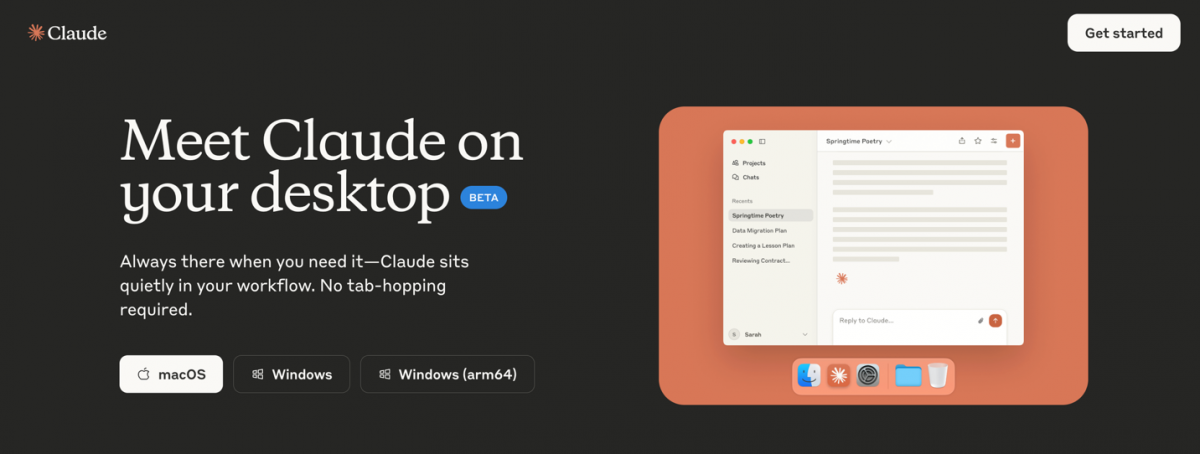
You’ll need Claude Pro to unlock Claude Code and MCP support. Download the Claude desktop app after subscribing.

Get Claude Pro + Desktop App

Step 2: Configure MCP in Claude Desktop

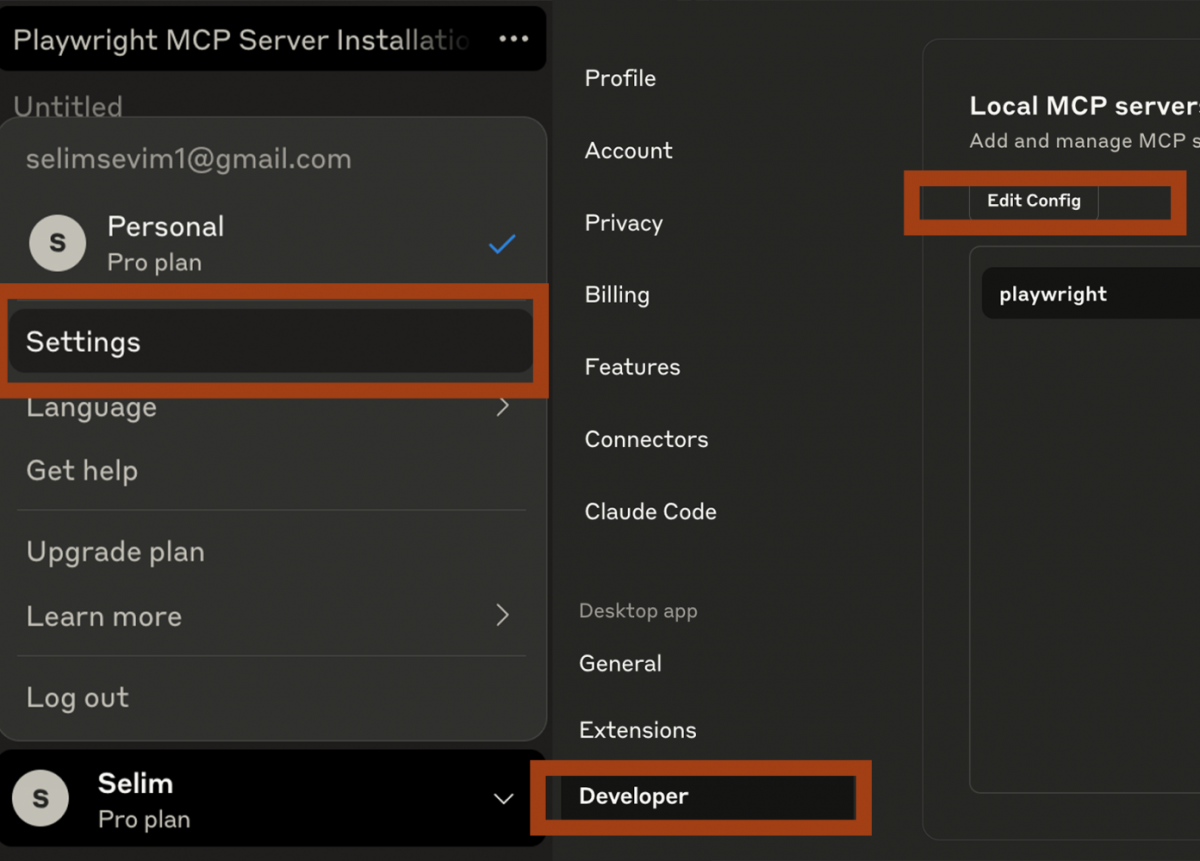
Open the Claude Desktop app → Settings → Developer → Edit Config. This opens your claude_desktop_config.json. Add the following snippet:

Configure MCP in Claude Desktop

This opens the folder that has claude_desktop_config.json. Edit it with a text editor and add the following snippet:

Step 3: Restart

Completely quit the Claude app and reopen it. Now the Playwright MCP server will be available under connected tools.

Step 4: Test it out

In Claude Code, type: 

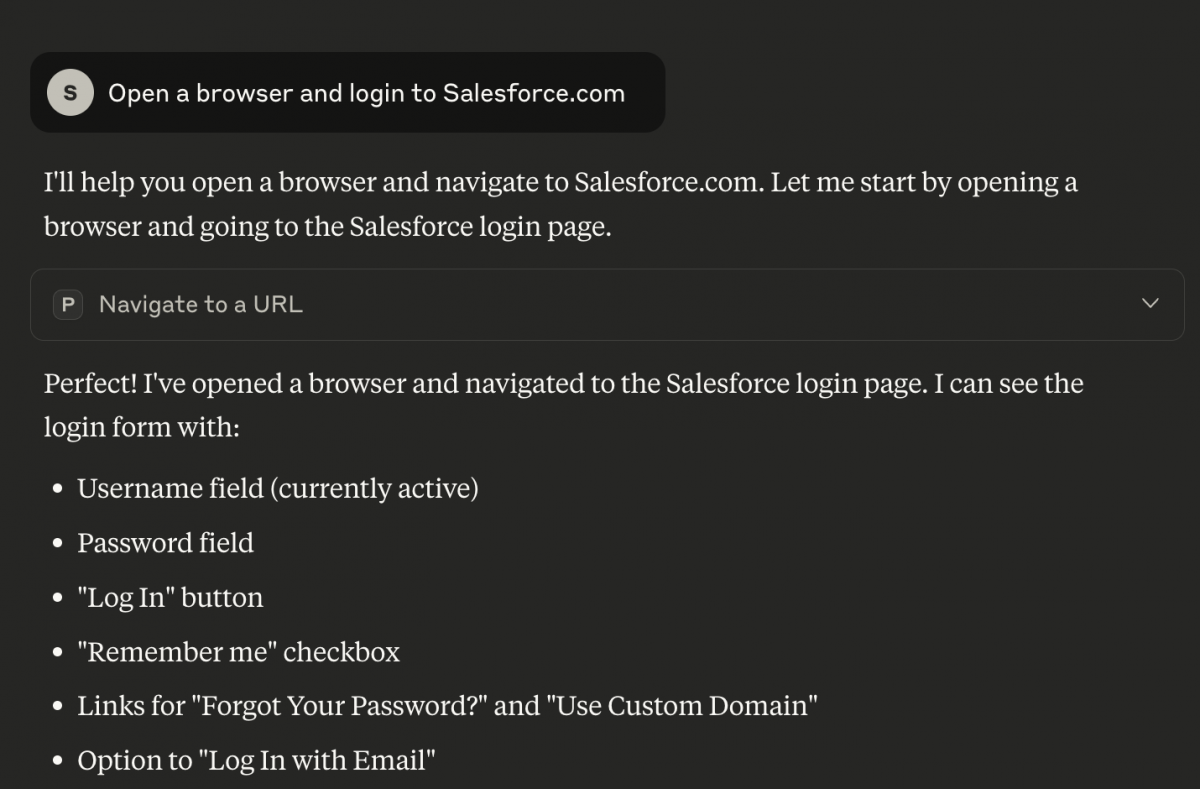
“Open a browser and navigate to salesforce.com.” 

If everything is set up correctly, Claude will spin up a browser instance and head straight to Salesforce — no manual coding needed.

Test it out

Ok, now the fun part: some test cases!

Test 1: Can it find an email and change its subject line with my prompts? 

I simply asked Claude: 

Find "Email X" on the page, click it. Go to Content tab and change subject line as "Hello World" 

Playwright MCP handled the navigation, located the subject line input, updated the text, and saved the draft — all without me writing a single line of code. 

However, I have to emphasize something important: on the page there wasn’t a clear “Content Tab” visible. A traditional automation script would have stopped right there with an “element not found” error. 

Instead, Claude reasoned through the interface like a human tester would. It responded: 

“I can see an ‘Edit Toggle Dropdown’ button. Let me click on that to see the edit options.” 

From there, it discovered the “Edit Content” option inside the dropdown and used that to change the subject line successfully. 

This is the real power: it’s not just automation by coordinates. It’s reasoning about what’s visible, trying alternatives, and adapting when the expected button or tab isn’t there.ons are auto generated.


Test 2: Can it explore Data Extensions and capture details? 

For the next test, I asked Claude: 

“On the page, go to the main folder → Data Extensions → find a data extension that includes asd in its name. Click on the data extension name to see its fields. Take a screenshot.” 

It did its best to follow through: navigating into the Data Extensions section, scanning for matches, and trying to open the right record. 

Now, here’s the interesting part. Even if Claude didn’t handle the test perfectly—for example, it struggled to click the data extension name in the simplest way—it still kept trying alternatives. Instead of giving up, it reasoned about what was available on the screen and attempted different paths to reach the fields. 

That persistence is encouraging. It shows that with Playwright MCP, the model isn’t just running rigid steps; it’s actively adapting to get you closer to the result you asked for, even in less-than-ideal UI scenarios.

Wrapping it up

What started as a simple curiosity with Playwright has now turned into something much bigger: the ability to turn Claude + Playwright MCP into a personal Salesforce Marketing Cloud agent. 

  • With just a Claude Pro subscription and a quick MCP setup, you can ask in plain language for tasks like “change the subject line” or “open this Data Extension and show me its fields”. 
  • The magic isn’t just the automation — it’s the reasoning. Where a normal script would fail with “element not found”, Claude finds another path (like spotting a dropdown and drilling down to “Edit Content”). 
  • Even when it doesn’t get everything perfect, it keeps trying, which makes it far more resilient than traditional scripted tests.

This isn’t about replacing developers or marketers. It’s about making repetitive UI tasks faster, smarter, and accessible to more people — especially in complex environments like Marketing Cloud Next. 

The takeaway? We’re entering an era where your Salesforce tools can be tested, validated, and even operated by an AI agent, without a single line of code.

Woman and man talking in the office (AI generated image)

Building a Next Best Action Engine for SFMC Using DigitalOcean Droplets (via SFTP Integration)

It was almost eight years ago — one of my first Salesforce Marketing Cloud (SFMC) projects — when I was asked to build an AMPscript email for a Next Best Action (NBA) campaign. Back then, AI wasn’t a buzzword, and “automation” basically meant a bunch of Python scripts someone had to run manually every week. 

The process was painfully manual: the data science team would crunch numbers, export a CSV with customer recommendations, and then hand it off to me for upload into SFMC. Only then could the platform send the “best” message to each person. It worked — sort of — but it always felt like there was something missing. 

That project stuck with me. The idea of Next Best Action — using data to decide what message each person should see next — has been spinning in the back of my mind ever since. I always wanted to build a smarter, automated, and more scalable version of it. Now, it’s finally time.

What is Next Best Action?

A Next Best Action model predicts the most relevant message, offer, or action for each customer at a given time. Instead of relying on static journeys or predefined rules (“if clicked, send discount”), NBA uses data and AI to evaluate multiple signals — such as email engagement, purchase behavior, and timing — to decide what should happen next. 

For example: 

  • A customer who opened three product emails but didn’t buy might get a personalized “compare features” message. 
  • Someone who clicked a discount link but didn’t complete checkout could get a reminder or product review email. 
  • A subscriber showing declining engagement — based on lower open and click rates — might be flagged by the model and routed into a re-engagement journey (sometimes called a churn-prevention flow) to win them back before they unsubscribe. 

This approach boosts engagement, improves conversion, and helps marketing teams move from campaign-centric to customer-centric communication.

Why Next Best Action Matters

At its core, Next Best Action (NBA) is about relevance. It’s about listening to what customers actually do — what they open, click, and buy — and using that to guide what happens next. Instead of blasting the same message to everyone, NBA helps you respond intelligently to each customer’s journey in real time. 

The beauty of it is that it turns marketing from a one-way broadcast into an ongoing, personalized dialogue. You’re not just asking, “What should we send next?” — you’re asking, “What does this person need next?”

Why File Drop

You might be wondering — why not just use APIs to move data between SFMC and the engine? The short answer: simplicity and cost. 

File drop (SFTP-based integration) may sound old-school, but it’s incredibly reliable, secure, and scalable for the type of data NBA needs to process. We’re talking about large datasets — engagement logs, product catalogs, and behavior history — which can easily reach hundreds of thousands of rows. 

Sending that much data over API calls every day would be both expensive and unnecessary. With file drops, we simply exchange CSVs once a day — predictable, auditable, and cost-efficient. 

It’s not fancy, but it’s the perfect match for high-volume marketing systems like SFMC, where automation and affordability matter more than real-time API calls.

Why Digital Ocean

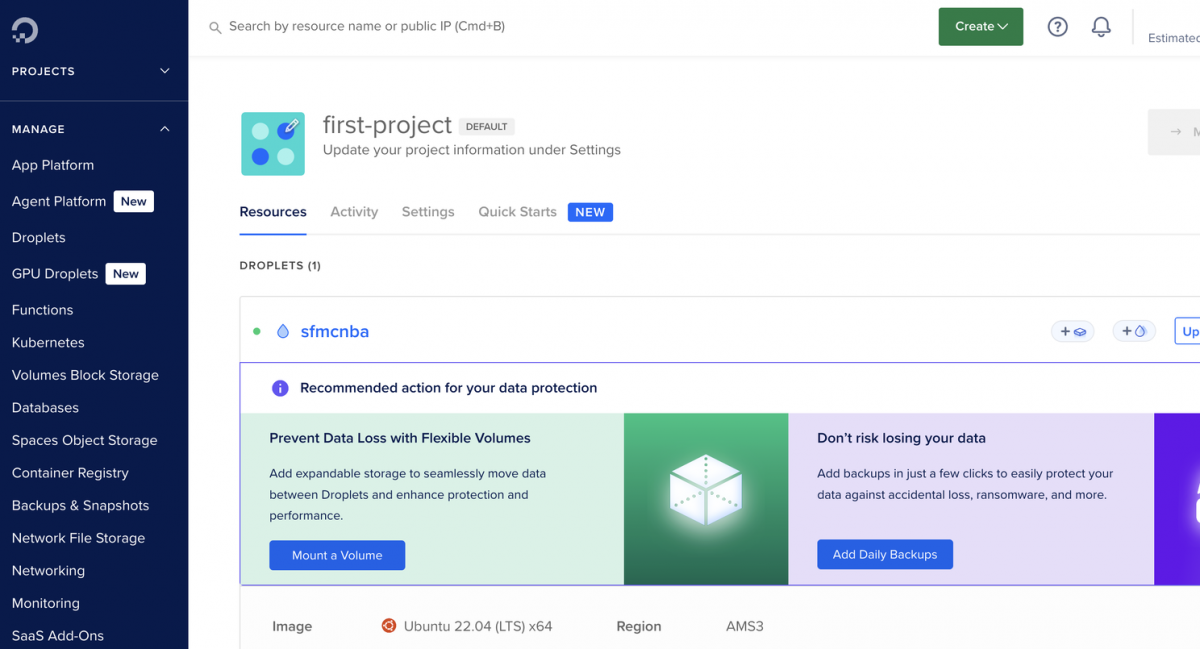
Fast-forward to today, and we finally have the tools to make that early vision effortless. DigitalOcean provides a scalable, low-cost compute layer that can host AI models or data pipelines without the need for expensive servers or over-complicated infrastructure.

Why Digital Ocean

To be fair, there wasn’t a grand technical reason behind choosing DigitalOcean — it’s simply easier to work with. For quick testing, demos, and lightweight production use cases like this, DigitalOcean is refreshingly simple compared to larger clouds like Google Cloud or AWS. You spin up a droplet, drop in your scripts, and you’re up and running in minutes.

The Plan

Here’s what we set out to build: 

  1. Three Data Extensions in SFMC to act as the foundation of the NBA engine. 
  2. An AI-powered NBA engine running on a DigitalOcean Droplet, which analyzes these daily files, predicts the next best action for each contact, and sends the scored results back into SFMC. 
  3. An SFTP-based integration to keep everything simple, reliable, and cost-efficient — no APIs, no middleware, just clean file exchanges. 

By the end, we’d have a fully functional, affordable, and intelligent Next Best Action system for SFMC — built entirely with tools marketers and developers already use every day.

Phase 1: Setting Up SFMC

Before we touch Digital Ocean, we need to prepare Salesforce Marketing Cloud (SFMC) — the foundation of our Next Best Action setup. This phase is all about defining what data we’ll send out and what we expect to receive back from the NBA engine. When you think about NBA in marketing, the data always tells the story. So, let’s make sure SFMC is ready to tell it properly. 

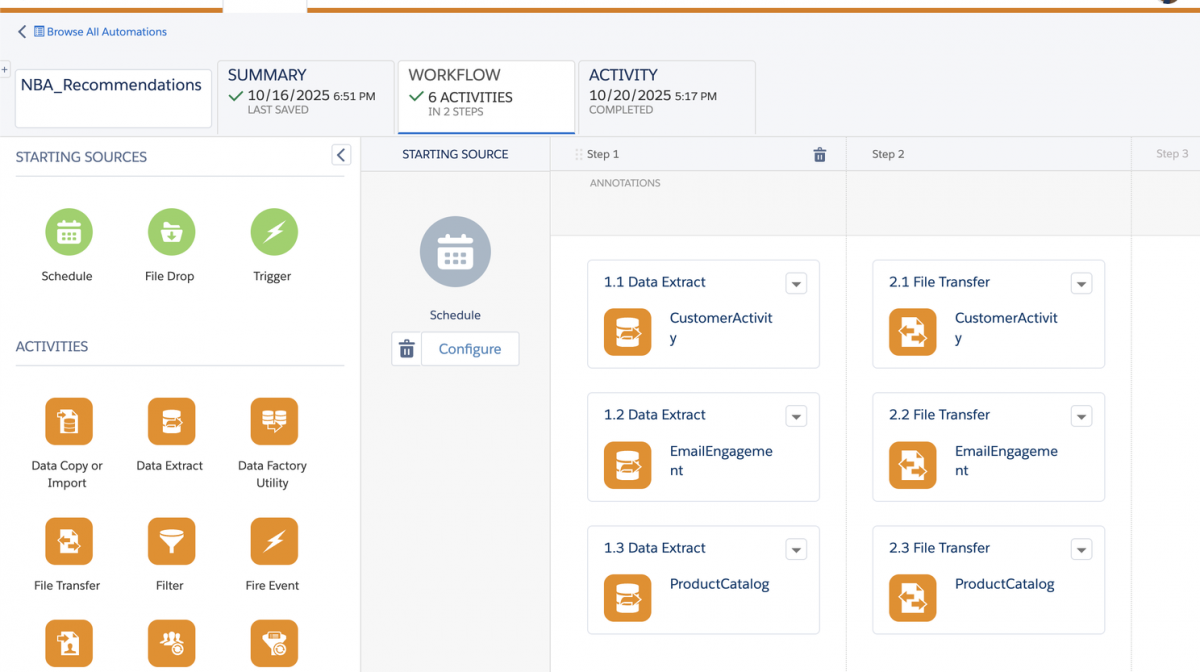
Step 1: Create the Core Data Extensions and Automations

We’ll start by creating three main Data Extensions (DEs): 

Three main Data Extensions (DEs)

We’ll start by creating three main Data Extensions (DEs):

  • CustomerActivity_DE → captures how customers behave on the website — browsing, clicks, and purchases. 
  • EmailEngagement_DE → keeps track of how they interact with your emails — opens, clicks, and timing. 
  • ProductCatalog_DE → provides context about what they’re engaging with — all the products, categories, and prices. 

Each of these DEs will export daily via SFTP, becoming the engine’s “eyes and ears.” They help the AI understand who’s engaged, what they’re looking at, and what’s available to promote.

Data Extensions (DEs)

Once these exports are flowing, SFMC has everything it needs to tell the story — and Digital Ocean will soon become the part that listens, learns, and predicts.

Step 2: Receive and Store the AI Outputs

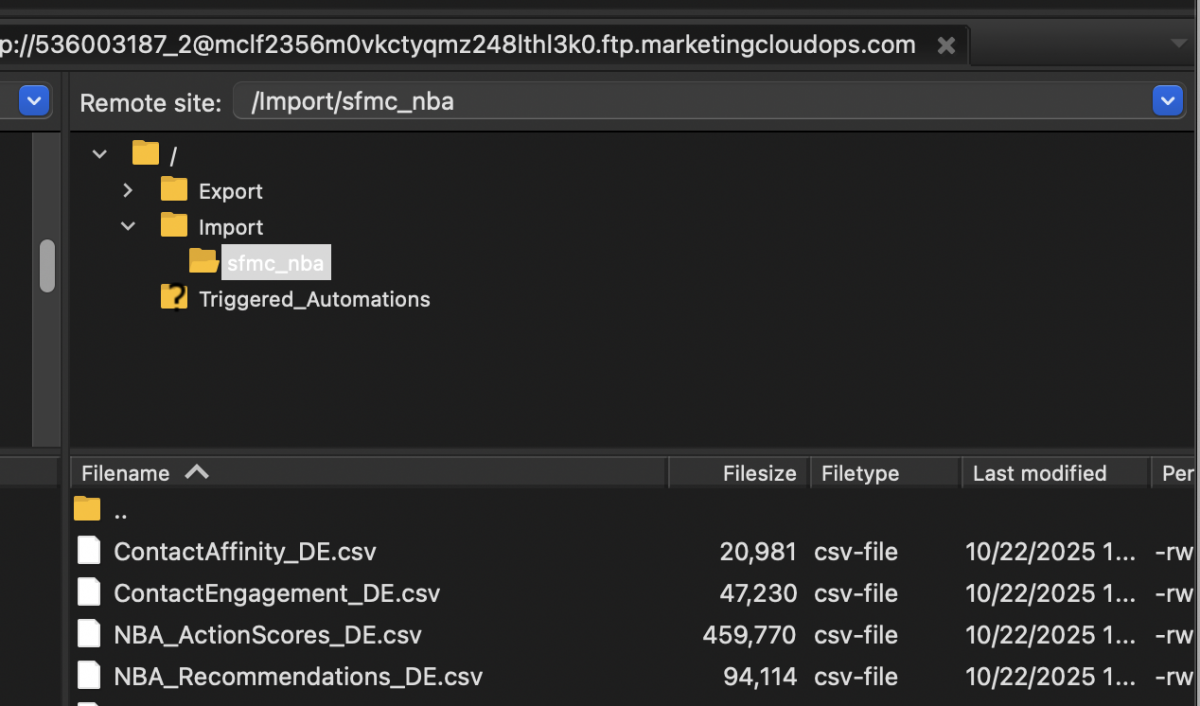
Once SFMC has shared its daily data with the NBA engine, the magic starts. The engine analyzes every click, view, and purchase, then sends four new files back to SFMC — each one built to drive smarter personalization. Here’s what comes back: 

  • ContactAffinity_DE → shows what each customer currently cares about most — the categories or products they’re “leaning toward.” 
  • ContactEngagement_DE → classifies engagement levels, from New to Active, Cooling, or Dormant. 
  • NBA_ActionScores_DE → scores every possible action (like product emails or category journeys) by predicted impact. 
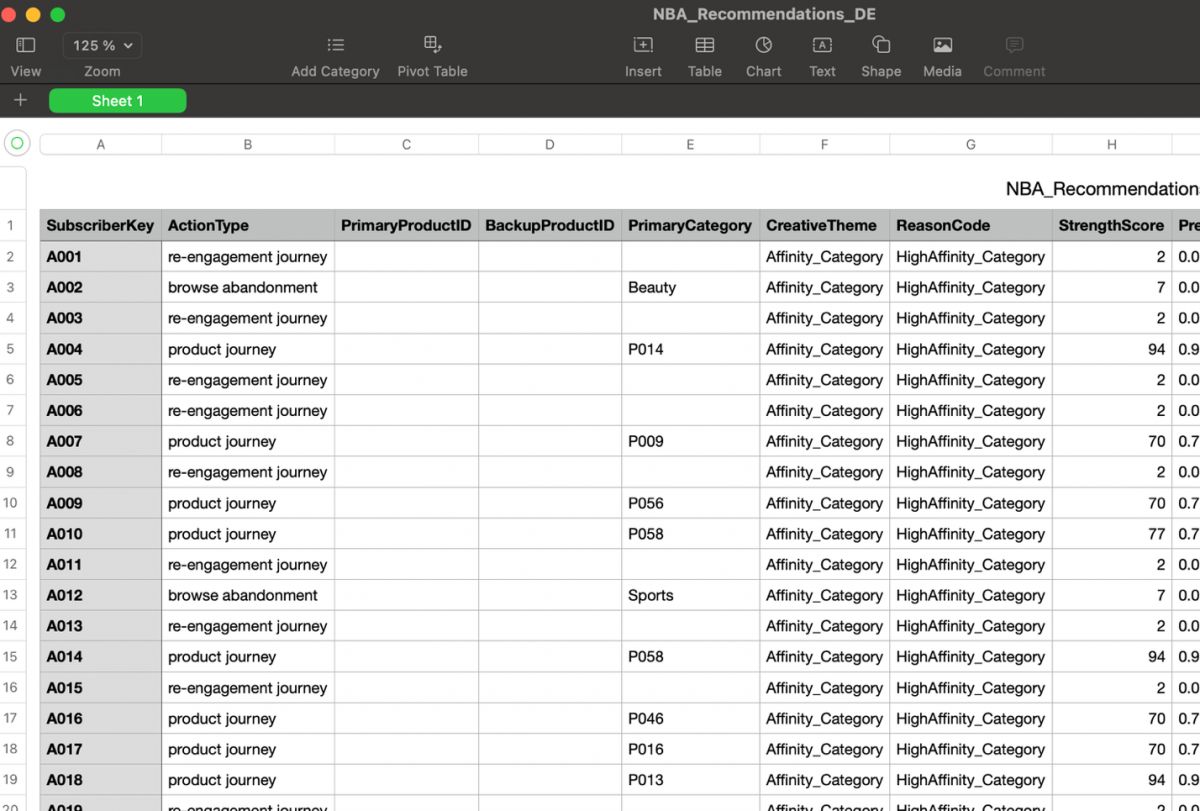
  • NBA_Recommendations_DE → delivers the final “next best actions” — ready to plug directly into Journeys, Email Studio, or Decision Splits. 

These four outputs close the loop: SFMC sends raw behavior, and the AI returns clear, prioritized next steps — all through the same secure SFTP connection.

Receive and Store the AI Outputs

The files end up in our Import folder,

At this stage, SFMC becomes more than a marketing platform; it becomes the action layer of your AI system.

Phase 2: Building the Engine on Digital Ocean

With Salesforce Marketing Cloud (SFMC) ready to send and receive data, the next step was to bring the intelligence to life — to actually decide what each customer should see next. 

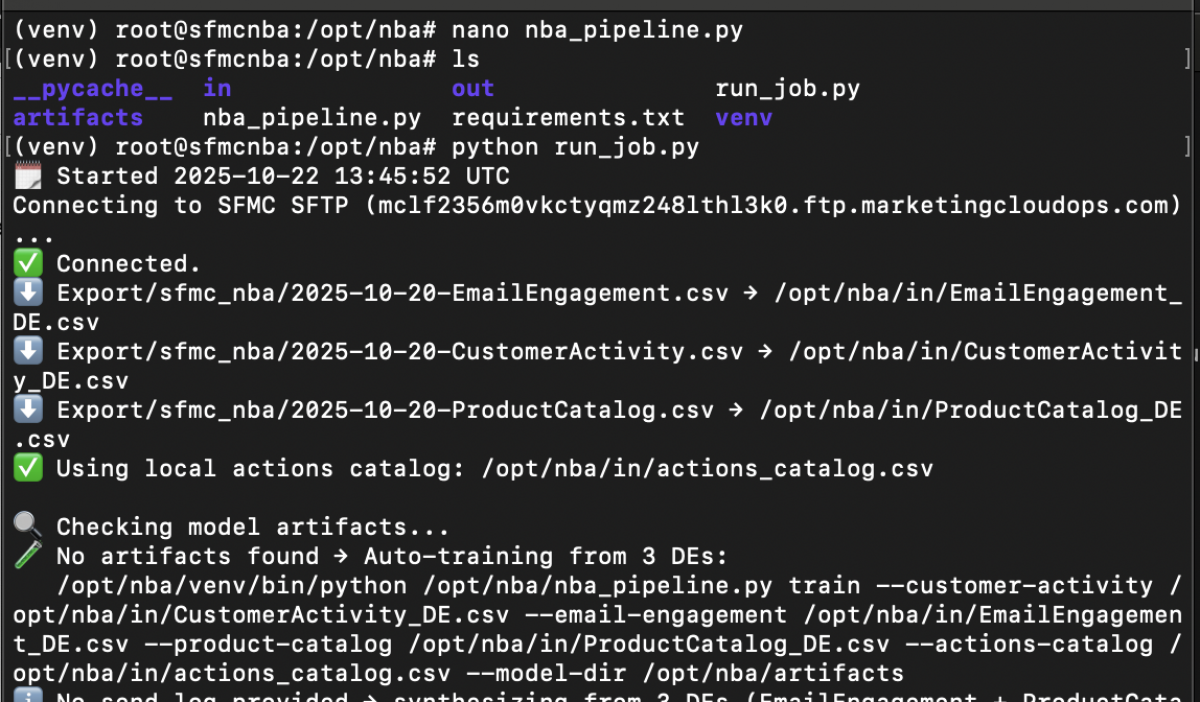
That’s where our NBA engine comes in. We deployed it on a small Digital Ocean Droplet, a lightweight cloud server that runs entirely on open-source Python. Every day, it connects to SFMC via SFTP, downloads the latest CSV exports, analyzes them, and pushes back the results — all automatically. 

At the heart of it lies a simple but powerful loop: 

  1. Read the data — the engine loads three CSV files from SFMC: 
  2. Blend it with business logic — the engine looks at an actions catalog, a small reference file that defines every possible journey or message type (for example, “re-engagement journey,” “cart recovery,” “price-drop alert”). 
  3. Decide the Next Best Action — using a mix of data science and configurable weights, the engine evaluates each customer’s intent and engagement level. It then scores which action makes the most sense at that moment — whether it’s sending a product recommendation, re-engagement email, or holding out entirely. 
  4. Generate recommendations — finally, it writes four output files: 

Everything happens inside a single script, with no manual triggers, no extra tools, and no APIs. It’s the marketing equivalent of a digital autopilot — always on, always learning, always optimizing who gets what next.

Building the Engine on Digital Ocean

And because it’s built on Open Source Python, the logic is completely transparent — you can see how decisions are made, retrain the model anytime, or even add your own business rules.

Phase 3: Automating the Workflow

Once everything is in place, the goal is simple — make it run on its own. No manual uploads, no waiting for someone to press a button. 

That’s where the automation loop comes in. Every day, at a scheduled time, the Digital Ocean droplet: 

  1. Connects securely to the SFMC SFTP 
  2. Downloads the latest CSV files — engagement, activity, and product catalog 
  3. Runs the Next Best Action engine to analyze patterns, predict behavior, and refresh recommendations 
  4. Uploads the updated results right back to SFMC — ready for use in email journeys, decision splits, and personalization 

The best part? It’s completely self-sustaining. If the model doesn’t exist yet, the engine automatically trains itself using the historical data. If it’s already trained, it just keeps learning from the new data — improving a little bit every day.

Automating the Workflow

What used to take a full team (data science, marketing ops, QA) can now happen quietly in the background. Every morning, SFMC wakes up to a fresh, data-driven set of next best actions — personalized, prioritized, and ready to send.

Phase 4: Bringing It All Together

With everything connected — SFMC, the NBA engine, and the automated file flow — the entire system runs quietly in the background, constantly learning from real customer behavior. Every click, open, and purchase becomes a signal. Every product viewed, every journey entered, every message skipped — it all feeds back into the model, helping it make slightly better decisions the next time around. 

The result? A marketing engine that actually listens. Instead of sending generic “catch-all” messages, your campaigns start to feel like real conversations — adapting to what each person is doing right now. No more guessing who should get what. 

No more endless journey branches or static rules. Just clean data in, intelligent recommendations out, and SFMC doing what it does best — delivering personalized, relevant experiences at scale. 

And the best part? It’s all powered by tools you already have: Salesforce Marketing Cloud, simple CSV exports, and an affordable cloud droplet on Digital Ocean. No APIs. No heavy integrations. No black-box AI. 

Just a smarter way to market — one prediction at a time.

Important Considerations

While the setup works beautifully in practice, there are a few things worth keeping in mind before bringing it into production: 

  • Data Quality Matters Most — The NBA engine is only as smart as the data you feed it. Make sure your email engagement and web activity feeds are clean, deduplicated, and refreshed daily. 
  • Start Simple, Then Scale — You don’t need every signal or channel on day one. Start with email + web behavior, prove value, then expand to SMS, push, or loyalty data later. 
  • Human Oversight is Key — The model can predict, but marketing still decides. Use the engine’s confidence scores to guide — not replace — your human intuition. 
  • Governance and Privacy — Ensure customer data stays secure. Since this solution runs outside of SFMC, align with your internal data protection and compliance policies. 
  • Tone = Strategy — Your choice of tone (Aggressive vs. Chill) impacts how assertively the model pushes actions. It’s not just a technical toggle — it’s a marketing philosophy.

Conclusion

What started years ago as a manual spreadsheet exercise is now a fully automated, intelligent marketing engine — one that reacts to customers in real time, learns from every engagement, and helps marketers focus on strategy instead of spreadsheets. 

This isn’t just a technical project. It’s a shift in mindset. A move from campaign-centric to customer-centric marketing — powered by simple, transparent AI. 

And the best part? You don’t need a data science team or enterprise AI budget to make it happen. Just good data, clear logic, and a little curiosity to experiment.

Want to Dive Deeper?

If you’re curious about the technical side — including the full Python code, data flow, and automation setup — I’ve published the complete project on GitHub: https://github.com/selimsevim/SFMC_NBA 

It includes the NBA engine script, orchestrator, and sample dataset structure so you can adapt it to your own SFMC setup.

Woman and man at office talking (AI generated image)

How accessible is your Salesforce solution – and why it matters

Accessibility might not be the first thing you think about in a Salesforce project - but overlooking it can cost more than you think! Here’s why it matters, and how a few small changes can make a big difference for your users, customers and your legal compliance

When working on Salesforce projects, I often see the same thing happen: accessibility gets pushed to the side. It’s not intentional – it’s just easy to focus on features, deadlines, and how things look (which are all super important!).

But the truth is, leaving accessibility out of the process early on can cause real headaches later. For your users, your customers, and your organisation too. 

And these days, accessibility isn’t just a “nice-to-have”. With laws like the European Accessibility Act (Tillgänglighetslagen) now in place (and expanding), the expectations are getting higher – both from a legal standpoint and from users who simply expect to be included.

So, what is accessibility?

In short, accessibility is about making sure everyone can use your digital services – no matter their ability. That includes people who use screen readers, navigate with a keyboard instead of a mouse, or need high colour contrast to read text clearly. 

Sometimes, it’s the little details that make the biggest difference. Things like: 

  • Using good colour contrast 
  • Making sure buttons can be reached with a keyboard 
  • Writing clear labels and headings
How accessible is your Salesforce solution – And why it matters

What does this mean in a Salesforce context?

In Salesforce, there are a few common places where accessibility issues tend to sneak in. For example: 

  • Experience Cloud sites that don’t work well with screen readers 
  • Flows that rely on colour alone to show progress or status 
  • Lightning components without proper labels or focus handling 
  • Page layouts that confuse users relying on assistive tech

None of these are difficult to solve – but they do require someone to notice them. And when you’ve been staring at the same screen for weeks, it’s easy to miss the gaps.

A few small fixes can go a long way

The good news is that many of these issues have simple fixes. Adding labels, reordering elements, adjusting contrast – small things that improve the experience for everyone, not just users with specific needs. 

That said, knowing what to look for isn’t always easy, especially if you haven’t worked with accessibility before.

Not sure where to start? We can help!

If you’re unsure where your Salesforce solution stands today in terms of accessibility, we can help. At Redpill Linpro, we offer a flexible Salesforce Accessibility Review – a short engagement where we go through your solution, identify potential problem areas, and provide practical, tailored advice on how to improve. 

Whether you’re maintaining an existing org, launching something new, or just want to feel more confident about meeting legal requirements like the European Accessibility Act – this is for you. 

What you’ll get: 

  • A practical, easy-to-follow accessibility report 
  • Feedback on both internal and customer-facing interfaces (including Experience Cloud, Flows, and custom components) 
  • Tailored tips and support for your developers and admins 
  • Optional team training and helpful resources to keep future builds on track

For more information

Contact us to learn more or to get help.

Icons representing different types of disabilities: motor, visual, cognitive, and hearing

Unlocking the Power of Salesforce Content Libraries: Your Team's Secret Weapon

If you’re a Salesforce user, you probably know it can do a lot. But have you ever explored Salesforce Content Libraries? Think of them as your team's ultimate content hub — a well-organized space where the right people can access the right content at the right time. Whether you’re in sales, marketing, or support, Content Libraries can make your life so much easier. Let’s break it down.

So, What Are Content Libraries?

In simple terms, Salesforce Content Libraries are organized repositories for storing files, documents, and media right inside Salesforce. But they aren’t just about storage; they help teams manage, share, and collaborate on content without leaving the platform. Think product brochures, case studies, sales playbooks, or even training videos — all in one place, and easily accessible when you need them most.

Why Should You Care?

Imagine you’re about to hop on a sales call, and you need that updated product sheet. Instead of scrambling through endless email threads or hunting down a colleague, you pop into the Content Library, search for the file, and boom — there it is. Content Libraries make finding and sharing content seamless, saving you time and headaches.

Real-World Use Cases

Here are just a few ways teams use Content Libraries to level up their workflows: 

  1. Sales Enablement: Equip your sales team with up-to-date pitch decks, product sheets, and proposal templates. No more outdated files floating around. 
  2. Marketing Asset Management: Store campaign collateral, branding guidelines, and social media assets in one spot, ensuring everyone uses the latest versions. 
  3. Customer Support Resources: Give support reps quick access to troubleshooting guides and FAQs so they can help customers faster. 
  4. Internal Training and Onboarding: New hires? No problem. Create a library packed with training videos, process documents, and company handbooks.

Pro Tips for Getting Started

  • Organize with Libraries and Folders: Create libraries for different departments or functions, then break them down into folders for easy navigation. 
  • Use Tags and Search: Tag content with relevant keywords so it’s searchable in seconds. 
  • Set Permissions: Control who can view, upload, or edit content to keep things organized and secure.

Ready to Give It a Spin?

If you’re already using Salesforce, setting up Content Libraries is a breeze. Once you start using them, you’ll wonder how you ever managed without them. From boosting productivity to ensuring content consistency, they’re a game-changer. So, what are you waiting for? Dive into Content Libraries and see the magic for yourself. 

Trust me — your future self will thank you.

Introducing Salesforce Agentforce: Transforming business functions with AI

Agentforce is an AI-powered platform designed to empower teams in multiple departments, such as sales, marketing, service and operations by automating routine tasks, delivering insights and enabling real-time support. This platform leverages generative AI to provide context-driven solutions, creating efficiencies across entire organizations, not just within customer service.
Introducing Salesforce Agentforce: Transforming Business Functions with AI
Image: AI generated

What is Agentforce?

Agentforce is an advanced generative AI tool that is built to work seamlessly within the Salesforce ecosystem. It combines the power of real-time data, intelligent automation and human-in-the-loop capabilities to support professionals across various roles. 

Whether it is helping sales reps qualify leads, enabling marketers to personalize campaigns or assisting customer service teams, Agentforce serves as a powerful co-pilot to enhance productivity across departments.

Key components of an Agentforce Agent

  • The agent’s role or purpose, which defines the job it should do and goals the agent should achieve. 
  • The knowledge or data an agent needs to be successful. This could be CRM data, knowledge articles, public websites, external data via Data Cloud etc. 
  • The type of actions that the agent is able to do. These are predefined tasks that an agent can perform based on a set trigger or instruction. For example, run a flow, prompt template or Apex code. 
  • The guardrails or guidelines of which the agent can operate under. These can for example be instructions that tell the agent what it can or can’t do or built-in security features in the Einstein Trust Layer. 
  • Lastly, the channels or applications where an agent can be located. This could be your CRM, mobile app, website etc.

Benefits of Agentforce

  • Increased efficiency: Agentforce is designed to support multiple business units, helping sales, marketing, operations and service teams achieve more with fewer resources. 
  • Always available: 24/7 availability to answer questions, deflect cases and meet service objectives on any channel. 
  • Replies naturally: Agentforce adapts its responses based on live data and context, enabling it to handle sophisticated scenarios across different functions. 
  • Seamless human-AI collaboration: Agentforce is designed to integrate with human workflows, passing complex tasks to users when needed and enabling a smooth transition between AI-automated tasks and human interventions. 
  • Based on trusted data: the agents are based on reliable sources, such as CRM data or external data via Data Cloud. LLM interactions from Agentforce are processed through the Trust Layer on the Einstein 1 Platform, ensuring customer data stays secure.

How does Agentforce differ from chatbots?

While chatbots offer basic automation in customer interactions, they are limited to scripted responses and predefined pathways. Agentforce, on the other hand, provides adaptive, AI-driven solutions that go beyond Q&A, assisting with workflows, analyzing data and adapting its responses to the context of any given interaction.

Conclusion

Salesforce Agentforce is a transformative tool that brings generative AI into multiple business functions, making workflows more efficient and helping teams work smarter. Its versatility coupled with its ability to draw on both real-time data and human insight, makes Agentforce a valuable asset for businesses looking to scale productivity and innovation across departments. 

As organizations embrace AI, Agentforce represents a strategic advancement in Salesforce’s vision to support intelligent, adaptable and collaborative work environments.

Life Sciences Cloud: Streamlining Clinical Trials from Recruitment to Enrollment

Salesforce has launched Life Sciences Cloud

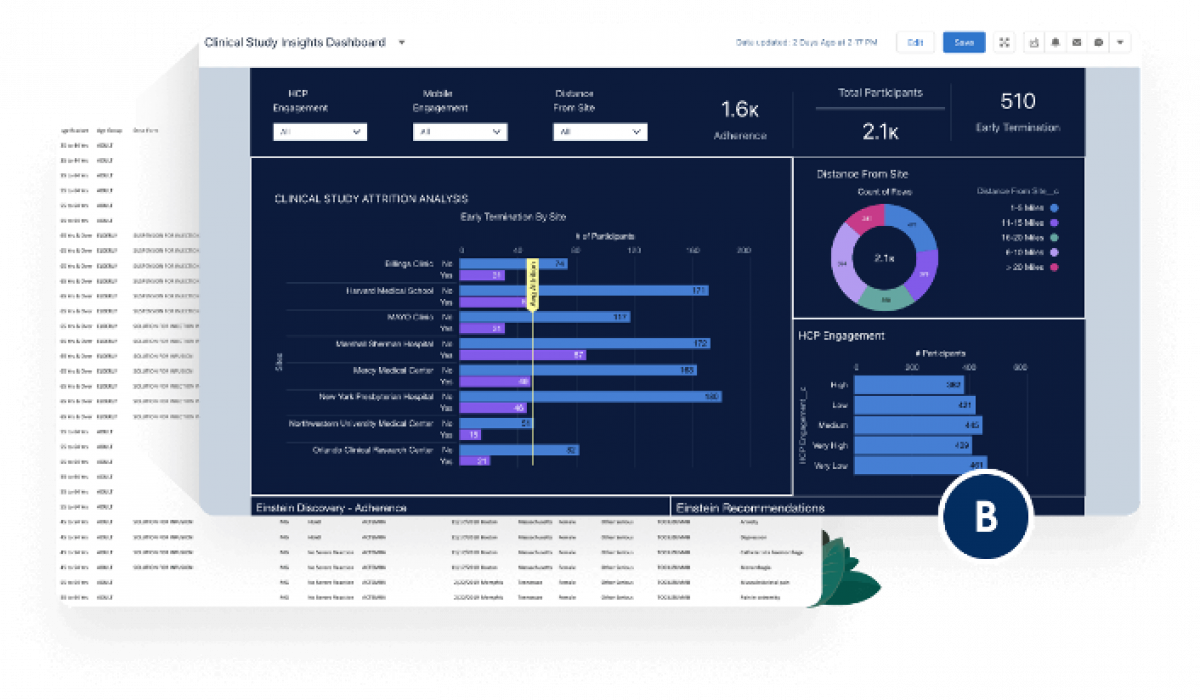
Salesforce has launched Life Sciences Cloud, an end-to-end, intelligent engagement platform spanning clinical to commercial operations. This platform empowers Pharma, Biotech, Biopharma, Consumer & Animal Health, and MedTech companies to foster healthier interactions with HCPs, partners, and patients through data-driven, compliant, and trusted innovations on the #1 AI CRM.

Recruiting candidates is a major challenge in clinical trials, consuming up to one-third of study time. Additionally, 80% of trials fail to onboard enough patients, causing delays. AI can improve efficiency and support for patients and HCPs. Notably, 86% of healthcare and life sciences leaders believe leveraging data and AI is crucial for future success.

Key Features:

● Participant Recruitment and Enrollment: Identify and recruit qualified candidates for clinical trials using generative AI, streamlining the screening process.

● Unify Clinical and Non-Clinical Information: Create holistic profiles using data from EHRs, claims databases, and social platforms.

● Patient Program Outcome Management: Automate and track the impact of education and support programs.

● Unified Data Platform: Integrate data from various sources for personalized patient and HCP engagement.

Life Sciences Cloud aims to reduce recruitment timelines, enhance patient engagement, and provide valuable insights for clinical trials.

Learn more: Life Sciences Cloud

Unlocking Breakthroughs: How Salesforce Health Cloud & Data Cloud Empower MedTech

Bilde1.png123456_0.png

Fragmented data hinders innovation. MedTech companies often struggle with siloed information across departments, hampering R&D and patient care. Here's how Salesforce Health Cloud and Data Cloud can bridge the gap, unlocking significant advantages:

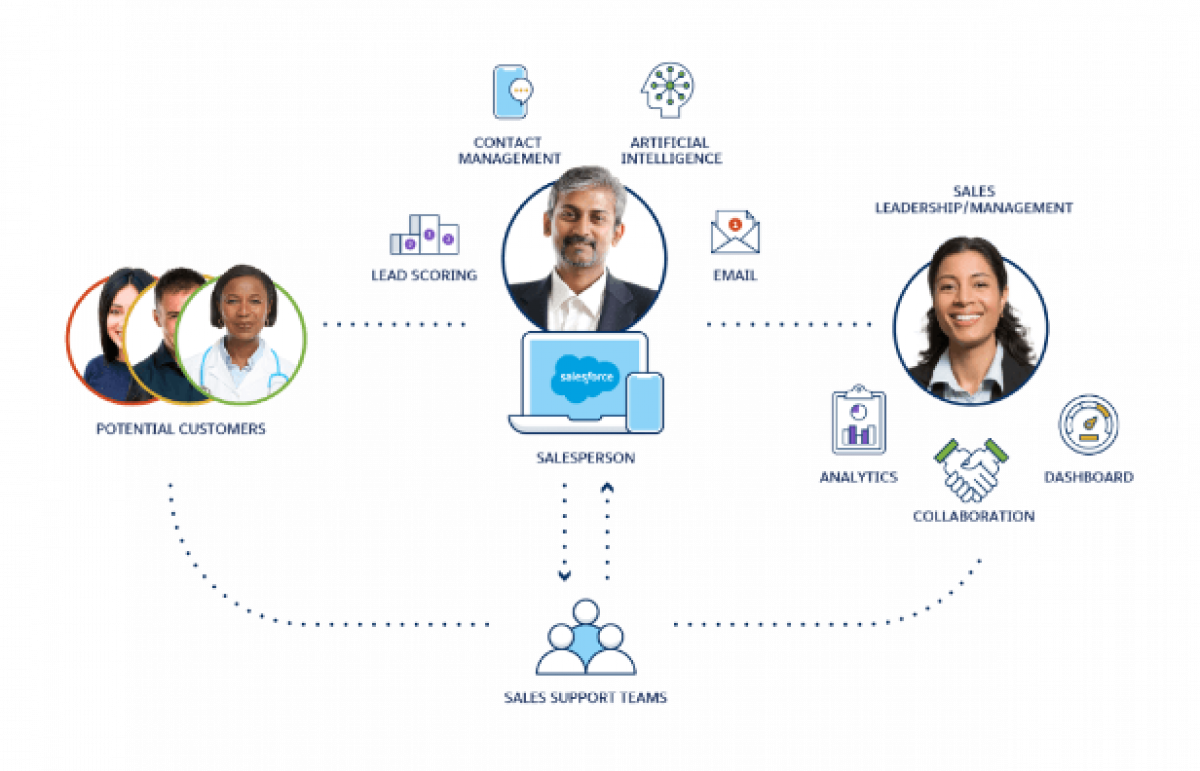
  • Unified Patient Data Platform: Break down silos and gain a holistic view. Data Cloud integrates patient data, device usage, clinical trial results, and real-world evidence (RWE) into a single platform. This empowers better decision-making and improved patient experiences.
  • Enhanced Patient Engagement: Health Cloud provides tools for personalized communication and remote monitoring. Integrate this with device data from Data Cloud to offer targeted interventions, improve medication adherence and personalize care plans.
  • AI-powered Innovation: Accelerate product development. Data Cloud's AI (Einstein) analyzes vast amounts of data to identify trends, predict patient outcomes, and optimize device design for better efficacy and user experience.

Beyond Innovation:

  • Simplified Compliance: Data Cloud ensures secure data storage and simplifies compliance with GDPR, HIPAA, and MDR (Medical Device Regulation). AI-powered analytics can help identify potential safety concerns and improve post-market surveillance.
  • Streamlined Operations: Leverage data-driven sales and marketing with Health Cloud's CRM for MedTech. Data Cloud provides deeper insights into customer needs and provider preferences, enabling targeted campaigns, improved sales forecasting, and better resource allocation.
  • Enhanced Customer Support: Offer proactive support by integrating device usage data with patient data. This allows for faster troubleshooting, remote device diagnostics, and improved customer satisfaction.

Unlocking the power of data, Salesforce Health Cloud & Data Cloud empower MedTech companies to deliver better patient care, bring innovative products to market faster, and optimize business performance. Ready to explore how this solution can transform your company? Contact us for more information.

Navigating the Digital Age: Life Sciences and the Power of Transformation

The life sciences industry is undergoing a transformative shift driven by the rapid adoption of digital technologies. This digital revolution aims to revolutionize every aspect of operations, from accelerating drug discovery to enhance patient care.

Digital Tools: The Engine of Life Sciences Innovation

Digital Tools: The Engine of Life Sciences Innovation

Digital services play a crucial role in various aspects of life sciences operations:

  • Research and Development (R&D): Digital tools facilitate data collection, analysis, and collaboration among researchers, leading to faster drug discovery and development cycles.
  • Production and Manufacturing: Digital solutions optimize production planning, inventory management, and quality control, ensuring efficient and compliant practices.
  • Regulatory Compliance: Digital platforms streamline regulatory submissions, track compliance obligations, and manage adverse event reporting.
  • Marketing and Sales: Targeted marketing campaigns, personalized customer interactions, and sales force automation tools drive growth and customer engagement.
  • Customer Service and Support: Self-service portals, knowledge bases, and live chat features improve customer satisfaction and reduce support costs.
Bilde1.png

The Continuous Improvement Imperative

While digital services are essential, the need for advancement is constant. Key areas for improvement include:

●      Integration: Seamless integration with existing IT infrastructure is critical to avoid data silos and streamline workflows.

●      Data Analytics: Advanced analytics capabilities are needed to gain actionable insights from vast datasets and drive informed decision-making.

●      Patient Experience: Leveraging patient data to personalize care plans and treatment recommendations can significantly improve patient outcomes.

Challenges on the Road to Digital Transformation

Implementing digital services effectively comes with its own set of hurdles:

●      Data Security and Privacy: Protecting sensitive patient data requires robust cybersecurity measures and adherence to data protection regulations.

●      Regulatory Compliance: Navigating the ever-changing regulatory landscape and complying with data privacy laws and industry regulations can be complex.

●      Integration Challenges: Integrating new solutions with existing systems can be difficult, leading to data silos and compatibility issues.

●      User Adoption and Training: Encouraging employee adoption and providing adequate training are crucial for successful implementation.

Bilde1.png123.png

Emerging Technologies: Shaping the Future of Life Sciences

Life sciences organizations are actively seeking innovative solutions to address these challenges and further enhance their digital capabilities:

●      Predictive Analytics: AI and machine learning can predict potential issues, optimize resource allocation, and improve patient outcomes.

●      Augmented Reality (AR) and Virtual Reality (VR): AR and VR technologies can be used for training, remote collaboration, and patient education.

●      Blockchain: This technology can enable secure data sharing among stakeholders while maintaining privacy and traceability.

Bilde1.png1234567.png

Prioritizing Digital Service Enhancements for Success

When prioritizing digital service enhancements, life sciences organizations should consider:

  • Automation: Automating repetitive tasks frees up employees to focus on higher-value activities and improves overall efficiency.
  • User Experience: User-friendly interfaces and intuitive navigation ensure seamless adoption and efficient utilization of digital tools.


Bilde1.png233344.png


  • Data Integration: Integrating data from disparate sources into a unified platform enables comprehensive analysis and informed decision-making.
  • Security and Compliance: Implementing robust cybersecurity measures and adhering to data privacy regulations is essential to protect sensitive information.
Bilde1.png1234.png

Unlocking the Potential: Salesforce Health Cloud as Your Trusted Partner

Salesforce Health Cloud is a powerful cloud-based platform specifically designed to meet the needs of life sciences organizations. It provides a comprehensive suite of solutions that can help you:

●      Gain a Unified Customer View: Obtain a 360-degree view of healthcare professionals, patients, and partners, enabling personalized interactions and targeted engagement.

●      Navigate Regulatory Compliance with Ease: Manage regulatory requirements effectively with built-in compliance tools and workflows.

●      Drive Data-Driven Decisions: Leverage powerful analytics to gain actionable insights from customer data, optimize marketing campaigns, and improve patient outcomes.

●      Facilitate Seamless Collaboration: Break down silos and foster collaboration among internal teams, healthcare professionals, and patients.

●      Mobilize Your Workforce: Access and manage customer data and activities from anywhere on any device with a mobile-first design.

Bilde1.png223.png

Salesforce Health Cloud is committed to helping life sciences organizations navigate the ever-changing digital landscape. By leveraging our industry-specific solutions and expertise, you can unlock the full potential of digital transformation and achieve lasting success.

#LifeSciences #DigitalTransformation #SalesforceHealthCloud #SalesforceLifeSciencesCloud #Innovation #PatientCare  #Salesforce